
App icon scaled to a 512 px grid
Scales a compact 24 px UI glyph cleanly to 512 x 512 px with even canvas padding while keeping strokes and corners razor sharp.
Resize SVG graphics losslessly right in your browser with zero uploads. Adjust width, height, units, viewBox padding, rotation, and flips, then export clean SVG or sharp transparent PNG.
Drop an SVG to resize without losing quality
Updates width, height, viewBox, padding, and orientation directly on vector paths.
Choose SVG fileOpen any vector sample below in our SVG resizer to test proportional scaling, optical padding, physical print units, and live viewBox readouts before dropping your own artwork.
Scales a compact 24 px UI glyph cleanly to 512 x 512 px with even canvas padding while keeping strokes and corners razor sharp.
Adds clean symmetric breathing room around a circular logo so avatars and storefront badges never touch the outer frame edge.
Converts pixel dimensions into real millimeter or inch sizing so stickers, labels, and craft templates import at exact scale.
Update vector dimensions, add canvas breathing room, and orient icons cleanly without opening heavy desktop illustration software.
Drag an SVG or SVGZ graphic onto the canvas, or click Choose SVG file. The editor reads its original width, height, and viewBox coordinates immediately inside local browser memory.
Enter exact width and height with proportional scaling enabled, pick pixel or physical print units, click Quick scale presets, add clean canvas padding, or rotate 90 degrees and flip horizontally or vertically.
Check the live output size readout, then click Download SVG for crisp scalable markup, Copy SVG to paste directly into code, or Download PNG to export a sharp raster at your chosen pixel size.
Engineered around clean SVG DOM and viewBox math so every vector scales smoothly without clipping paths or rasterizing curves.
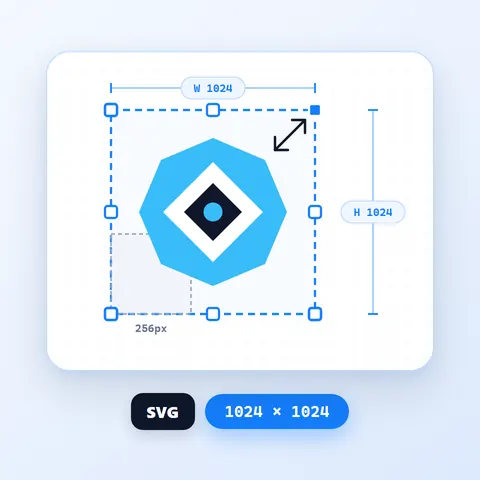
Editing only width and height on an SVG that lacks a viewBox cuts off half the illustration. Our SVG resizer automatically establishes and preserves a valid viewBox before applying your new dimensions so every Bezier curve scales smoothly.
Type exact target dimensions for icons, favicons, banners, or badges, or use quick scale buttons to double or halve artwork in one click. Keep proportional aspect scaling active to prevent stretched circles or distorted typography.
Switch effortlessly between screen pixels (px) and real-world physical units such as millimeters (mm), centimeters (cm), inches (in), or points (pt) when you change SVG size for cutting machines, laser layouts, or print templates.
Icons that sit flush against the viewBox edge often look cramped inside buttons and app launchers. Use the Padding slider to expand the viewBox evenly on all four sides, adding optical breathing room while keeping every stroke crisp.

Need a directional arrow mirrored or a tall badge rotated sideways? Apply 90-degree turns, horizontal flips, or vertical flips directly to the vector coordinate system so the final SVG stays sharp and self-contained.

Proprietary logos, UI component packs, and client diagrams never touch an external server. Every resize calculation, vector serialization, and optional PNG raster export finishes locally inside your browser tab.
Five key principles to scale SVG files predictably across browsers, design systems, and physical print layouts.
Every scalable SVG relies on two separate measurements: the internal coordinate space declared by viewBox (min-x, min-y, width, height) and the outer display box set by width and height attributes. When you resize SVG graphics properly, the viewBox defines what portion of the drawing is visible while width and height declare how large it renders. Missing a viewBox causes browsers to clip the drawing instead of scaling it, which is why our studio always guarantees a clean viewBox before updating output dimensions.
Forcing a wide horizontal wordmark into a 512 x 512 square without preserving proportions stretches letters awkwardly. Instead, scale SVG paths proportionally until the longer side fits inside your target frame, then expand canvas padding so the graphic rests comfortably inside a square grid. This technique is standard across iOS app icons, favicon kits, and 24 px UI icon libraries where visual balance matters as much as raw pixel count.
Web browsers map CSS px cleanly across 1x, 2x, and 3x Retina displays, making px the right default whenever you change SVG size for websites, React components, or pitch decks. When preparing badges, vinyl decals, or laser patterns for Cricut, Silhouette, or desktop publishing, switch the unit selector to mm or in so physical dimensions transfer accurately without guesswork.
An SVG stroke is drawn half inside and half outside its mathematical path boundary. If a 2 px outline touches x=0 or y=0, scaling the graphic can leave the outer half of that stroke shaved off at the viewport border. Adding even a small padding margin while you resize SVG files expands the viewBox around outer strokes, rounded line caps, and subtle shadows so every edge exports cleanly.
If your source SVG carries wide empty artboard margins around a tiny logo, remove that extra space first with Crop SVG before dialing in final dimensions here. After you resize SVG online to your target grid, strip editor bloat in SVG Optimizer, render batch transparent bitmaps via SVG to PNG, or compile a multi-size Windows icon bundle in SVG to ICO.
Common engineering, product design, and print preparation tasks where exact vector dimensions matter.
Normalize mixed-size icons from different sources onto one consistent 24 px, 32 px, or 48 px bounding box with balanced optical padding.
Quickly change SVG size attributes to prevent layout shifts, fix oversized header logos, and export exact-pixel PNG fallbacks for social cards.
Scale crisp emblems up to 512 px or 1024 px for store listings, pitch decks, and partner kits while keeping lossless vector quality intact.
Use this browser SVG resizer to set real millimeter or inch dimensions and rotate or mirror artwork cleanly before cutting or printing.
Clear answers about lossless scaling, viewBox behavior, padding, physical units, PNG output, and local browser privacy.
No. When you click Download SVG or Copy SVG, the file stays a pure mathematical vector. Updating width, height, and viewBox scales curves cleanly to any size, whether 16 px or billboard scale, with zero blur.
Keep the aspect-ratio option enabled in the control bar. Entering a new width recalculates the exact proportional height automatically, and vice versa, keeping circles round and lettering natural.
Our SVG resizer detects missing viewBox attributes automatically, derives the proper coordinate frame from the existing dimensions or rendered vector bounds, and writes a clean viewBox into the output so browsers scale it reliably.
Yes. Adjust the Padding control to add even transparent breathing room around all four edges of your vector without shrinking or distorting stroke proportions.
Yes. Use Rotate 90°, Flip H, and Flip V in the Orientation panel to adjust arrow directions, mirror emblems, or turn vertical layouts sideways alongside your new dimensions.
Yes. After dialing in your target pixel dimensions and optional padding or rotation, click Download PNG to render a crisp transparent PNG at that exact output resolution right in your browser.
No. All SVG parsing, viewBox math, orientation transforms, and PNG exports run completely inside your browser tab memory. Your artwork stays private on your own hardware.
Use SVG Resizer when you want to scale SVG output dimensions, switch units, add padding, or rotate the entire graphic. Use Crop SVG when you want to trim away empty surrounding whitespace or cut out a specific region of a larger vector.
Drop any SVG or SVGZ file to scale SVG dimensions, tune viewBox padding, rotate or flip cleanly, and save sharp SVG or PNG output locally.
Choose SVG file