
Classic 35mm film negative reversal
Applies full RGB negative inversion (255 minus R, G, and B) to inspect scanned film strips or flip tonal polarity cleanly with zero color banding.
Invert image files free in your browser with private local processing and zero uploads. Switch between full RGB negative, hue-preserving dark mode, channel flips, and solarize.
Drop images here to invert colors
Supports PNG, JPG, WebP, and AVIF. Drop or paste up to 20 images, processed locally.
Processed locally in your browser. Images never leave your device.
Load any sample below into this negative photo converter to compare classic RGB inversion, hue-preserving dark mode, and photographic solarization interactively before opening your own files.
Applies full RGB negative inversion (255 minus R, G, and B) to inspect scanned film strips or flip tonal polarity cleanly with zero color banding.
Uses Lightness-only HSL inversion so harsh white chart backgrounds turn sleek dark charcoal while blue, green, and amber series colors keep their original hues.
Combines adjustable Sabatier solarization thresholds or single-channel RGB inversions to craft striking editorial graphics and album artwork.
Flip film negatives, convert white diagrams for dark themes, or test creative channel inversions locally in seconds.
Drag PNG, JPG, WebP, AVIF, GIF, or BMP files up to 50 MB onto the studio, click Choose image, or press Ctrl+V (Cmd+V on Mac) to paste a screenshot straight from your clipboard. Everything decodes locally in browser memory.
Pick Classic Negative for exact RGB reversal, Smart Dark Mode to invert lightness while preserving brand hues, 180-degree Hue Flip, single Red, Green, or Blue channel inversion, or Solarize with an adjustable 0 to 255 threshold. Drag the split slider to compare live.
Select PNG, JPG, or WebP output at full original pixel dimensions. Transparent PNG and WebP artwork preserves every alpha pixel byte-for-byte, and multi-file queues bundle cleanly into a single batch ZIP archive.
Go well beyond a plain negative switch with dark-mode lightness math, selective RGB channels, solarization, and smooth batch processing.
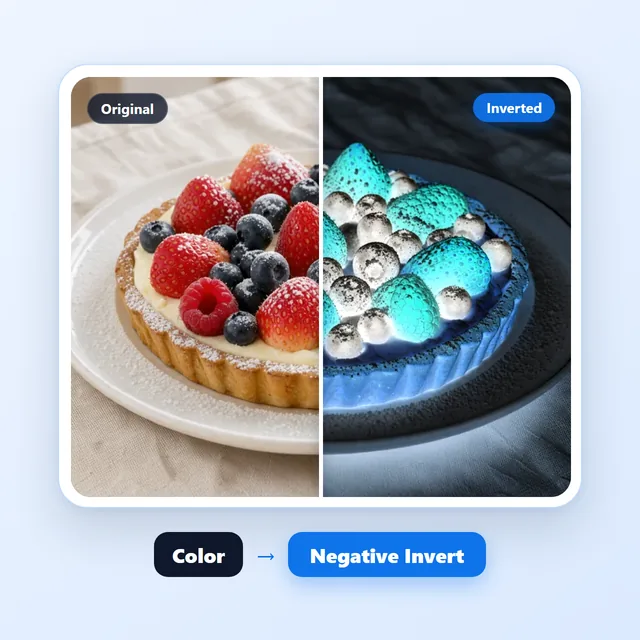
Compute exact per-channel inversion (255 minus red, green, and blue) at full pixel precision. This standard negative photo converter mode reverses black into white, flips color negatives back into positive previews, and lets printmakers invert black-on-white artwork for dark garments or film positives.
When you reverse image colors online on charts, math equations, UI screenshots, or documentation diagrams, ordinary RGB inversion turns crisp blue links orange and green indicators magenta. Smart Dark Mode converts pixels to HSL and flips lightness alone (L becomes 1 minus L), giving you deep dark backgrounds while keeping every color hue faithful.
Rotate every color halfway around the color wheel while keeping original brightness and saturation untouched using 180-degree Hue Flip, or invert only the Red, Green, or Blue channel independently to produce surreal duotone color casts, scientific false-color comparisons, and bold poster graphics.
Recreate the classic darkroom Sabatier effect by inverting only tones brighter than your chosen 0 to 255 Solarize threshold, producing luminous silver-toned edges and dramatic midtone ridges. Pair any of the seven modes with the 0% to 100% Strength slider to blend inverted pixels smoothly with the original image.
Drag the vertical split divider across your canvas or slide the accessible keyboard comparison bar to judge readability, contrast, and hue fidelity against the source at 60 fps. Global clipboard paste lets you capture a white diagram, press paste, invert colors of image pixels in one click, and export immediately.
Need to invert image icons, whiteboard slides, or scanned sheets together? Queue up to 20 pictures in the thumbnail filmstrip, preview each file live, keep transparent PNG and WebP alpha channels completely untouched, and save either the active file or the entire batch as one organized ZIP archive locally.
Five practical techniques for picking the right inversion math for film scans, technical diagrams, accessibility checks, and poster design.
Full RGB inversion flips both lightness and hue together, which destroys color-coded meaning on financial graphs, circuit schematics, and app mockups. When adapting white-background diagrams for dark slide decks or dark-theme wikis, select Smart Dark Mode to invert lightness alone. White paper becomes deep slate, black labels turn crisp white, and semantic greens, reds, and blues keep their exact visual identity without jarring hue shifts.
Classic Negative applies exact 255-minus-channel math across red, green, and blue, making it ideal whenever you need to invert image scans of black-and-white film strips, hand-drawn ink stencils, or X-ray style reference studies. Because the transformation is completely deterministic and runs at native pixel dimensions without re-scaling, applying Classic Negative twice returns identical pixel values in lossless PNG without compounding softness or color noise.
Inverting just the Red, Green, or Blue channel twists everyday snapshots into rich cyan-crimson or cobalt-gold palettes while preserving natural shadow structure and depth. When you invert image graphics for surreal, metallic highlight outlines reminiscent of analog darkroom prints, switch to Solarize and sweep the threshold slowly between 90 and 170 while dialing Strength to 70% or 85% so key subject details stay legible.
Dark websites and video lower-thirds frequently need white versions of dark PNG logos or hand-drawn line icons. Drop transparent PNG artwork into this studio, choose Classic Negative or Smart Dark Mode, and export as PNG or WebP. Because our engine copies original alpha values byte-for-byte without filling transparent backgrounds, your inverted icon drops cleanly onto any colored header with zero white halo.
Color inversion is often just the first step in a bold print or editorial study. After you invert image tones here, convert a reversed scan into balanced monochrome with Black & White Image, simplify dramatic inverted palettes into crisp flat screen-print layers with Posterize Image, or craft textured retro patterns in our Halftone Generator. To shift specific hues intentionally afterward, open Recolor Image.
Everyday technical, accessibility, photography, and design workflows powered by instant local color inversion.
Convert bright white architecture charts, plots, and code diagrams into sleek dark-mode visuals in seconds using hue-preserving Lightness inversion and clipboard paste.
Preview scanned monochrome and color film negatives quickly, test Sabatier solarization thresholds, and inspect shadow detail using the live split comparison bar.
Flip black transparent PNG logos to pure white for dark headers, invert colors of image stencils for screen printing, or test bold complementary hue variations.
Reverse high-glare white worksheets, sheet music, and study scans into comfortable dark-background PNGs privately on your own device with zero uploads.
Clear answers about RGB negative vs dark-mode lightness inversion, alpha transparency, batch ZIP export, and browser privacy.
Classic Negative subtracts every Red, Green, and Blue value from 255, reversing both brightness and color hues completely. Smart Dark Mode converts pixels to HSL and flips lightness alone, turning white backgrounds dark while keeping blue, green, and red hues intact on charts and screenshots.
Yes. The browser pixel engine preserves your original alpha transparency byte-for-byte whenever you export as PNG or WebP. That makes flipping black transparent icons, signatures, logos, or vector-style stamps into clean white dark-theme artwork effortless with zero solid background boxes.
Yes. You can drop or paste up to 20 images (up to 50 MB each) into the queue, click thumbnails in the filmstrip to inspect how your chosen mode looks on each picture, and export every inverted file together inside a single ZIP archive.
Solarize recreates the photographic Sabatier effect: any RGB channel value brighter than your chosen threshold (0 to 255, default 128) gets inverted, while darker values remain untouched. Sliding the threshold left or right shifts where the luminous edge transition appears.
No. All file decoding, 60 fps split-canvas preview rendering, full-resolution pixel inversion, and batch ZIP archive creation run strictly inside your local browser on ImageToPsd.AI. Sensitive charts, scanned records, and unreleased creative drafts never leave your computer or phone.
Yes. Alongside Classic Negative and Smart Dark Mode, the control panel includes 180-degree Hue Flip (which rotates every color halfway around the wheel while holding brightness and saturation steady) plus individual Red Channel, Green Channel, and Blue Channel inversion modes.
Yes. Copy any chart, slide, or diagram to your system clipboard and press Ctrl+V on Windows or Cmd+V on Mac anywhere on this page. The pasted image loads immediately onto the live split-comparison canvas ready to invert and save.
No. Every exported file preserves your exact native source pixel width and height with zero downsizing and zero watermarks. Choose PNG for strictly lossless pixel fidelity, or select JPG or WebP when smaller file sizes are preferred for web pages.
Drop or paste any photo or diagram into our free browser tool on ImageToPsd.AI to test negative, dark-mode, channel, and solarize modes privately.
Choose image