
Circular company seal (double-ring emblem)
Classic corporate seal with curved top and bottom text, star dividers, concentric borders, and navy ink for official packets.
Design crisp circular seals, oval emblems, and rectangular office marks with our browser-based rubber stamp maker. Customize curved ring typography, borders, stars, ink color, and vintage rubber distress locally, then download transparent 300 DPI PNG, scalable SVG, or press-ready EPS.

Load a preset into our round stamp maker workspace to inspect circular text tracking, concentric rings, center dates, and ink grain before typing your company text.
Classic corporate seal with curved top and bottom text, star dividers, concentric borders, and navy ink for official packets.

Bold framed rectangular status mark with slight organic tilt and subtle ink texture built for PDF proofs and review sheets.

High-visibility red document mark with double-line framing and transparent backing so contract text stays legible underneath.
Create authentic seals and transparent PDF overlays in seconds without manual arc-path layout in desktop design suites.
Start from a circular seal, classic oval emblem, or rectangular frame. Pick single, double, or notched rings and tune border thickness.
Type top and bottom arc phrases, center status words, or registration codes inside this company stamp maker. Adjust spacing, stars, and red, blue, black, or green ink.
Keep clean vector strokes for laser-cut physical stamps or add light vintage ink grain for paper realism, then export transparent 300 DPI PNG, SVG, or EPS.
Combines mathematical arc typography with realistic ink styling so digital PDF marks and physical laser-cut dies look sharp.
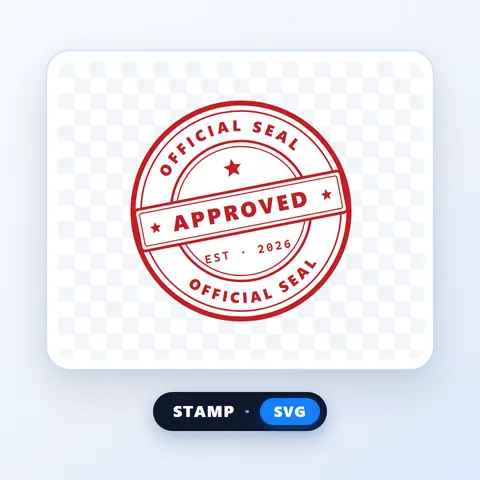
Switch smoothly between round notary rings, oval emblems, and rectangular office marks with balanced concentric borders and clean inner rules.
Inside this round stamp maker, top and bottom text paths stay upright automatically for effortless reading, complete with font size, tracking, and star spacers.
Blend from crisp solid vector lines to realistic lightly speckled rubber ink, and add subtle rotation for authentic hand-stamped document placement.
Every PNG keeps a pure transparent alpha channel with zero opaque white box, so text and table lines stay clear inside open stamp rings on PDFs and Word files.
Ordering a physical self-inking or wood-mounted die? Turn distress to zero in this digital stamp maker and download sharp SVG or EPS paths ready for CO2 laser rubber engraving.
Entity names, registration IDs, and internal document labels never leave your browser tab. All arc rendering and exports run strictly in local memory.
Five practical PDF placement, ink styling, and laser-engraving rules for clean digital seals and physical rubber stamps.
Transparency separates an authentic ink impression from a clumsy opaque sticker. Exporting a transparent 300 DPI PNG from this rubber stamp maker lets you layer the mark over a signature line in Acrobat, Preview, or Word while underlying lines stay readable through the open ring.
Deep navy blue and crimson red stand out cleanly against black printed text and signal an active stamped original rather than a flat photocopy. Lowering layer opacity to roughly 85% inside your PDF editor mimics translucent stamp-pad ink.
When preparing SVG or EPS artwork for a physical stamp engraver or photopolymer die, disable ink distress so lines stay solid. Keep inner rules at least 0.4 mm thick and avoid hairline serifs under 7 pt so carved rubber ridges print cleanly.
Cramming too many characters into one circle crowds letters along tight curves. When using a seal maker online for round corporate marks, put your organization name along the top arc and city or registration code along the bottom arc, separated by stars at three and nine o'clock.
Graphic document stamps communicate workflow status and visual branding, whereas legally binding digital certificates rely on cryptographic e-sign tools. Finishing an office packet? Pair your seal with Signature Maker, create matching emblems in Logo Maker, rasterize proofs in SVG to PNG, or prep press curves in SVG to EPS.
Everyday office administration, packaging craft, publishing, and brand workflows powered by local vector stamps.
Build crisp APPROVED, RECEIVED, REVIEWED, CONFIDENTIAL, and ARCHIVED marks for digital PDF packets, purchase orders, and filing folders.
Use this digital stamp maker to create round company seals and return-address marks for letterheads, certificates, and kraft boxes.
Prepare solid black vector SVG and EPS stamp files ready for local engravers producing wood-block or self-inking stamps.
Create vintage postmark badges, workshop completion seals, ex-libris bookplates, and weathered print overlays.
Answers on transparent PNG overlays, PDF placement, laser-engraving SVG prep, ink distress, and privacy.
Choose a round, oval, or rectangular frame in the rubber stamp maker above, enter ring and center text, pick an ink color and optional distress level, and download transparent 300 DPI PNG, SVG, or EPS free in your browser.
Yes. Every PNG renders onto a clean transparent alpha canvas with zero white box around or inside the border for direct PDF and Word layering.
Yes. Turn off vintage ink distress for solid edges, pick black ink, and download SVG or EPS. Laser engravers can cut directly from those clean vector paths.
Download the transparent 300 DPI PNG and insert it using Add Image or Custom Stamp in Adobe Acrobat, macOS Preview, Microsoft Edge, or Word.
Yes. Use center lines for dates, status labels, or company numbers, and toggle star or dot dividers between the top and bottom circular arcs.
Round seals read far more naturally when bottom text runs left-to-right along the lower curve. The arc engine flips and aligns the bottom baseline automatically.
No. Graphic seals convey visual approval, branding, or document status, while legally regulated e-signatures require certificate-based cryptographic signing.
No. All geometry, ink distress rendering, and PNG, SVG, or EPS exports execute strictly inside your local browser memory.
Customize your circular seal or office status stamp locally, add optional vintage ink grain, and download transparent PNG, SVG, or EPS free in your browser.
Design your stamp