
Executive business card (minimalist contact)
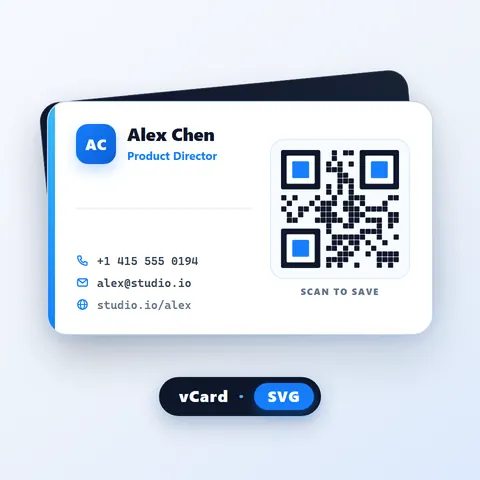
Compact vCard 3.0 layout encoding name, title, company, phone, email, and URL for crisp 20 mm placement on matte or letterpress stock.
Turn your name, title, phone, email, and website into a permanent one-scan contact graphic using our browser-based vCard QR code generator. Every code embeds offline vCard 3.0 data recognized natively on iPhone and Android, exporting directly to SVG, PostScript EPS, or 300 DPI PNG.

Load a contact sample into our business card qr code generator to see how clean fields keep module density low and print legibility crisp on compact 3.5x2 inch cards.
Compact vCard 3.0 layout encoding name, title, company, phone, email, and URL for crisp 20 mm placement on matte or letterpress stock.

High-contrast contact code with elevated error correction so booth visitors scan smoothly across a counter under expo lighting.

Streamlined solo contact card pairing portfolio URL, mobile number, and email while keeping matrix modules wide and open.
Build permanent, no-redirect contact graphics ready for business cards, email footers, and pitch decks.
Enter first and last name, company, job title, phone, email, website, and optional office address. Leave unused fields blank so the QR grid stays spacious.
Match your stationery with dark foreground modules on a light card face, pick error correction strength, and confirm clean quiet margins.
Point your phone camera at the screen to verify the native Add Contact sheet, then download vector SVG, press-ready EPS, or 300 DPI PNG.
Built for universal address-book support, low dot density, and crisp vector output on commercial print stationery.
RFC 2426 vCard 3.0 with structured N and FN lines opens cleanly in Apple Contacts, Google Contacts, and Samsung Phone directly from the native camera without parsing quirks.
Business cards leave zero room for blurry raster pixels. Download pure vCard QR code svg files or PostScript EPS vectors that drop cleanly into InDesign, Illustrator, Affinity Publisher, and Figma.
Because every phone number and email lives inside the QR pattern rather than behind a remote short link, printed stationery scans reliably in convention halls and flights with zero signal.
Accented Latin names, multilingual titles, and international dialing codes (+1, +44, +81) encode cleanly in UTF-8 so contacts split accurately into First and Last fields.
Extra text shrinks each square dot. Live preview lets you verify right away when trimming a long note keeps modules generous for 18 mm business card placement.
Direct mobile numbers, work emails, and office addresses stay strictly in local browser memory with zero uploads, indexing, or link tracking.
Five typography and prepress rules that make printed contact QR codes scan in one second on any phone.
Dynamic contact links depend on internet access and a remote server staying online forever. A static code from this vCard QR code generator stores your record inside the symbol itself, so prospects at crowded trade shows tap Save Contact immediately with zero loading screens.
Every additional line pushes the matrix to a denser version with smaller dots. On an 89 x 51 mm (3.5 x 2 inch) business card, include core details only: name, role, company, primary phone, email, and short website URL for instant low-light camera focus.
Print contact QR codes at least 18 mm to 22 mm square on business cards and 35 mm or larger on event lanyards. Keep a clean four-module light quiet zone around all edges and clear of trim lines or foil ridges.
Uncoated cotton, kraft, and linen card stock absorb ink slightly more than gloss cards. Place a crisp vCard QR code svg or EPS graphic in 100% black or deep navy over a pale face, avoiding inverted white-on-black dots on porous paper.
Scan a 1:1 paper proof on both iPhone and Android before printing a full box. Building a full stationery suite? Design cards in Business Card Maker, print guest signs with WiFi QR Code Generator, encode web links via QR Code Generator, or prep press curves in SVG to EPS.
Networking, sales, and corporate print workflows where one-scan saving replaces manual typing.
Use this contact QR code generator on business cards, property flyers, yard signs, and closing packets so leads save your number accurately.
Place crisp SVG contact codes on lanyard badges, booth banners, and closing slides for effortless lead capture.
Add vector vCard graphics to invoices, vehicle magnets, lookbooks, and mailers so repeat clients reach you fast.
Produce uniform SVG and PostScript EPS contact codes across company-wide stationery without managing redirect links.
Clear answers on offline scanning, vCard 3.0 fields, minimum print size, and local privacy.
Enter your name, company, role, phone, email, and website in the vCard QR code generator above, adjust colors and margins, test live with your phone camera, and download SVG, EPS, or 300 DPI PNG free in your browser.
No. Contact fields live directly inside the static QR grid, so iPhones and Android devices open the Save Contact sheet completely offline.
Yes. Standard vCard 3.0 payloads are supported out of the box by iOS Camera and modern Android camera apps for two-tap address-book saving.
Never. With zero redirect servers or third-party hosting links, printed cards remain scannable indefinitely while your contact details remain current.
Long addresses or bios pack more dots into the same square. Limiting fields to name, role, company, phone, email, and short URL keeps modules large and sharp at 20 mm.
Yes. Adding international prefixes like +1, +44, or +61 ensures recipients can dial or text you reliably from any country.
Use SVG or EPS in Illustrator, InDesign, Affinity Designer, or Figma for razor-sharp press edges. Pick 300 DPI PNG for slide decks and email footers.
No. Every vCard payload is assembled and exported strictly inside local browser memory with zero uploads or tracking redirects.
Enter your contact details privately on your device, scan-test the offline preview live, and export SVG, EPS, or 300 DPI PNG free in your browser.
Create vCard QR code