
Printable digital wall art at 300 DPI
Rewrites a 72 DPI digital illustration header to crisp 300 DPI losslessly so print shops and digital download buyers see exact 8 x 10 or 12 x 16 inch output dimensions.
Use this free image DPI converter right inside your browser with zero uploads. Read print dimensions in inches and centimeters, and update PNG or JPEG headers to 300 DPI losslessly.
Drop images here to change DPI resolution
Batch up to 30 PNG or JPG images. Losslessly updates print DPI headers or resamples pixels for print.
Processed locally in your browser. Zero server uploads.
Load any sample below into this 300 dpi converter to inspect its existing DPI header, see real-world print dimensions in inches and centimeters, and test lossless header updates right in your browser.
Rewrites a 72 DPI digital illustration header to crisp 300 DPI losslessly so print shops and digital download buyers see exact 8 x 10 or 12 x 16 inch output dimensions.
Updates both JPEG JFIF APP0 density and EXIF resolution tags together so commercial print preflight portals verify 300 DPI consistently without re-encoding artwork.
Demonstrates optional Resample mode to calculate and scale pixel dimensions cleanly to hit a target physical print width in inches at 300 DPI.
Check embedded resolution metadata and update PNG or JPEG print headers to 300 DPI or any custom setting locally.
Drag one or multiple pictures onto the workspace, or click Choose image. Our local header parser reads existing PNG pHYs chunks and JPEG JFIF or EXIF resolution tags instantly and calculates physical print size in inches and centimeters.
Click a preset (72, 96, 150, 300, or 600 DPI) or enter any custom value from 1 to 1200 DPI. Keep Lossless Header Mode to update resolution bytes with zero pixel re-encoding, or switch to Resample Mode to scale pixels to a desired print width in inches.
The tool immediately reads back the written output header to confirm your target DPI is properly encoded, then saves your single PNG or JPG file or bundles multiple print assets into a single ZIP archive locally.
Real binary header patching, dual JFIF and EXIF synchronization, live print-size math, and optional pixel resampling in your browser.
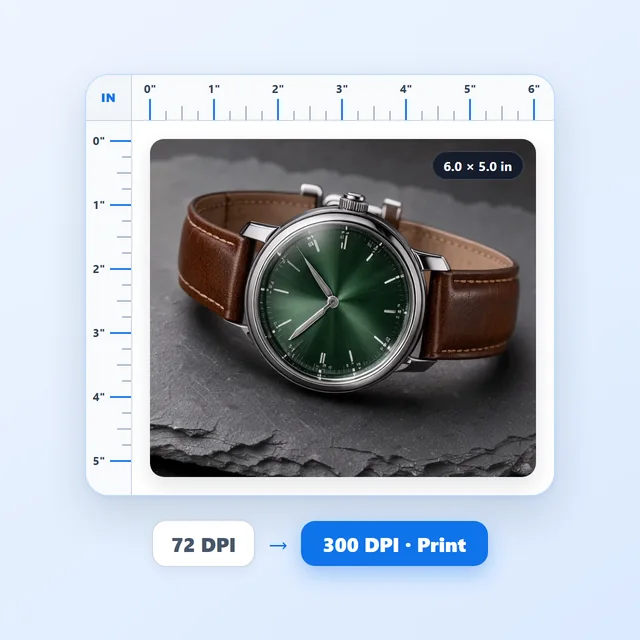
Before you change photo dpi online, see what your file actually declares. The parser inspects PNG pHYs chunks and JPEG JFIF APP0 plus EXIF resolution tags directly from raw bytes, displaying current and projected print sizes in inches and centimeters.
When you convert image to 300 dpi in Header Mode, PNG IDAT data and JPEG SOS entropy streams are copied byte-for-byte with zero re-compression. PNGs get a CRC32-verified pHYs chunk after IHDR while JPEGs keep full compression sharpness.
Print portals often reject files when tools update JFIF density but leave an old 72 DPI tag inside EXIF. Our image dpi converter updates JFIF APP0 and patches EXIF XResolution, YResolution, and ResolutionUnit in place (Little-Endian and Big-Endian) so every app agrees.

Click presets for 72 DPI (screen), 96 DPI (web and office), 150 DPI (large posters), 300 DPI (flyers, magazines, and wall art), or 600 DPI (fine line art and labels), or type any custom integer DPI from 1 to 1200.
Need to scale actual pixels to match a target print width in inches at 300 DPI? Switch to Resample Mode, enter your desired physical width, and the browser engine scales cleanly (up to 8192 px max side) while writing the matching DPI header.

Every output file is verified from its written bytes so you know the updated DPI header will pass print checks. Process full sets of digital prints or flyers locally in your browser with zero uploads and save one ZIP archive.
Five practical print-prep rules explaining DPI metadata vs pixel count, choosing 150 vs 300 DPI, and avoiding preflight rejections.
DPI stands for dots per inch and tells printers how densely to pack your existing pixels onto physical paper. A 3000 x 3600 pixel photograph prints at 10 x 12 inches at 300 DPI, or 20 x 24 inches at 150 DPI, using the exact same pixels. When you change image dpi in Lossless Header Mode, your pixel count stays untouched and visual sharpness never degrades, while print apps immediately display the true physical size.
Digital downloads and high-resolution camera exports often contain plenty of pixels (such as 2400 x 3000 px) yet still carry a default 72 DPI tag that triggers print-portal warnings. Use Lossless Header Mode to convert image to 300 dpi cleanly without touching a single pixel. Switch to Resample Mode only when a portal demands more total pixels for a specific target width in inches, keeping in mind that modest resizing looks far cleaner than extreme enlargement.
Handheld items viewed closely, including business cards, brochures, wedding invitations, photo prints, and fine art wall prints, look sharpest at 300 DPI, while monochrome ink line art or tiny barcode labels benefit from 600 DPI. Large banners, yard signs, and trade-show backdrops viewed from several feet away print cleanly at 150 DPI without creating unwieldy gigabyte files. Use 72 or 96 DPI strictly for screen graphics and slides.
Passing a 300 DPI metadata check is only half of great printing: you also need enough pixels for the chosen paper size. Multiply your target print dimensions in inches by 300 to confirm ideal pixel counts, such as 2400 x 3000 px for an 8 x 10 inch print or 3600 x 4800 px for 12 x 16 inches. Watch the live inches and centimeters readout in this 300 dpi converter to verify physical size instantly.
When preparing a complete press or shop bundle, combine this image dpi converter with our other local print utilities. Adjust exact pixel dimensions first in Image Resizer if a marketplace requires strict canvas widths, scrub camera GPS footprints beforehand using Remove EXIF Data, or package finished 300 DPI graphics into clean printable documents with PNG to PDF or JPG to PDF.
Practical publishing, print-on-demand, photography, and office workflows where accurate DPI headers prevent print surprises.
Update 72 DPI digital exports into verified 300 DPI PNG and JPEG files across multi-size wall art packs in seconds using lossless batch conversion.
Change photo dpi online on flyers, menus, stickers, and wedding stationery so local print shops and online printers accept files cleanly on the first upload.
Check exact print dimensions in inches and centimeters for gallery enlargements and update JFIF and EXIF resolution headers together without re-compressing master JPEGs.
Meet strict 300 DPI and 600 DPI figure submission rules for academic papers, thesis charts, and conference posters privately in your browser.
Straight answers about lossless DPI header rewriting, JFIF vs EXIF tags, pixel resampling, print size math, and browser privacy.
Not in Lossless Header Mode. When you change image dpi on PNG or JPEG files while keeping the original format, our engine rewrites only the PNG pHYs chunk or JPEG JFIF and EXIF resolution headers while copying image pixels byte-for-byte with zero re-compression.
Web browsers, cameras, and many drawing apps write 72 DPI or omit a resolution header entirely, even when the picture is 4000 px wide. Using this 300 dpi converter rewrites the header so print software reads the true physical size in inches at 300 DPI.
Lossless Header Mode keeps your exact pixel width and height untouched and changes only the DPI metadata tag, which changes the stated print size in inches. Resample Mode actually scales the pixel dimensions to hit a target physical print width in inches at your chosen DPI.
JPEG files can store DPI in two places: JFIF APP0 and EXIF APP1. Our engine updates or inserts JFIF APP0 and simultaneously patches EXIF XResolution, YResolution, and ResolutionUnit in place so print portals and desktop apps always agree on the same DPI.
No. Every DPI header read, lossless binary patch, optional pixel resample, output verification pass, and batch ZIP export executes completely locally inside your browser tab on ImageToPsd.AI. Print masters, client artwork, and personal photographs never leave your computer or phone.
Yes. Drop multiple PNG or JPEG files into the workspace at once to inspect every file's original DPI and physical print dimensions in inches side by side, then update every header together and download a single organized batch ZIP archive.
You can click built-in presets for 72, 96, 150, 300, and 600 DPI, or enter any custom integer resolution between 1 and 1200 DPI. Standard print artwork typically uses 300 DPI, large posters use 150 DPI, and crisp monochrome line graphics use 600 DPI.
Because standard print portals expect PNG or JPEG resolution headers, leaving output on Keep Original automatically exports non-PNG/JPEG inputs as clean PNG files with a fresh CRC32-verified pHYs chunk set to your chosen DPI, or you can switch explicitly to JPG output.
Drop any PNG or JPEG into our free browser image DPI converter on ImageToPsd.AI to check print size in inches and update DPI headers losslessly.
Choose image