
Rounded SaaS product favicon kit
Generates a crisp rounded-square web mark with subtle 4% padding, clear outer transparency, and matched manifest theme settings for modern web apps.
Use this free favicon generator directly inside your browser with zero uploads. Turn any logo or image into a complete Favicon Kit ZIP containing multi-size favicon.ico, Apple Touch and Android PNGs, site.webmanifest, and copy-ready HTML tags.
Drop a PNG image here to create an ICO icon
Builds true multi-size Windows ICO files (16 to 256 px) plus a full favicon kit.
Runs locally in your browser. Nothing is uploaded.
Or try a sample icon
Load any sample logo below into this favicon generator to preview live browser tab rendering, inspect every pixel size, and test square, rounded, and circular kits before dropping your own artwork.
Generates a crisp rounded-square web mark with subtle 4% padding, clear outer transparency, and matched manifest theme settings for modern web apps.
Packages a bold lettermark across 16x16, 32x32, and 48x48 ICO frames plus Apple Touch and Android PNG icons that stay legible in dense bookmark bars.

Frames a storefront badge inside an anti-aliased circle with 6% padding and clean background fill so it stands out sharply on both light and dark browser tabs.
Turn any PNG, JPG, or WebP mark into every file modern browsers, iOS home screens, and Android devices expect.
Drag a PNG, JPG, WebP, GIF, BMP, or AVIF image (up to 30 MB) into this favicon converter. Starting with a square 512x512 px logo or larger gives crisp edge quality across every desktop, Apple, and Android output size.
Check the live browser tab preview and pixel size strip as you test Square, Rounded, or Circle shapes, Contain or Fill square framing, 0% to 25% padding, and transparent, white, or custom brand fill (which also sets theme_color in site.webmanifest).
Click Download Favicon Kit (ZIP) to save all eight production assets in one bundle, or click Download .ICO if you only need a standalone multi-size icon. Copy the ready-made HTML link tags straight into your page head element.
Every size, manifest entry, and resampling detail engineered for modern browsers, mobile home screens, and clean deployment.
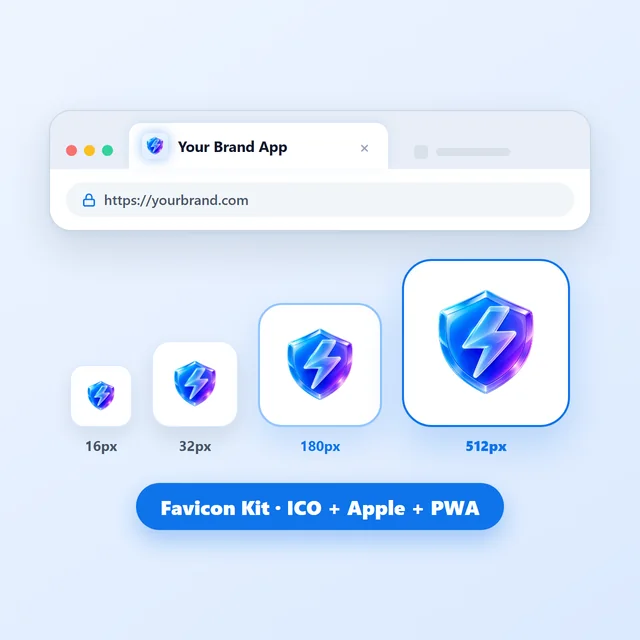
Shipping modern site icons takes more than one tiny file. Clicking Download Favicon Kit (ZIP) inside this favicon generator packages favicon.ico (16, 32, and 48 px), favicon-16x16.png, favicon-32x32.png, apple-touch-icon.png (180x180), icon-192.png, icon-512.png, site.webmanifest, and head-tags.html in one clean archive.
Never dig up old link tag syntax across documentation tabs. The studio displays clean HTML head markup ready to copy with one click, while the bundled site.webmanifest file automatically writes matching icon paths, standalone display metadata, and your chosen custom backdrop as theme_color.

A logo that shines at 512x512 px can turn unreadable inside a 16x16 browser tab. Inspect a realistic live tab mockup right above the actual-size pixel strip so you can dial in padding, contrast, and framing before publishing a single file.
Standard canvas downscaling often blends transparent borders with black RGB values, leaving ugly muddy outlines around crisp logos. Our favicon converter uses exact premultiplied-alpha area-averaged downscaling so 16x16 and 32x32 icons stay sharp with spotless alpha edges.
Convert any image to favicon cleanly whether it arrives as a transparent PNG symbol or an opaque square JPG. Add an anti-aliased rounded or circular mask, adjust 0% to 25% inner breathing room, or set a crisp white or brand-hex backdrop so dark marks stay visible in dark-mode browser tabs.

Unreleased startup marks, stealth product logos, and client brand kits stay strictly on your own computer. This favicon maker renders every PNG size, ICO binary, manifest JSON, and ZIP kit directly inside local browser memory.
Five practical engineering details to make your site icon look sharp across desktop tabs, iOS home screens, Android launchers, and search snippets.
Today's web ecosystem expects a concise, dependable set of icon files rather than dozens of obsolete tiles. Desktop browsers check /favicon.ico (packing 16, 32, and 48 px frames) alongside crisp 16x16 and 32x32 PNGs for high-DPI tabs and bookmarks. iOS Safari requests apple-touch-icon.png at 180x180 px when visitors pin your site to an iPhone or iPad home screen, while Android Chrome and PWAs read icon-192.png and icon-512.png from site.webmanifest. Using this favicon generator creates every required size together.
Unzip the downloaded kit and place favicon.ico, favicon-16x16.png, favicon-32x32.png, apple-touch-icon.png, icon-192.png, icon-512.png, and site.webmanifest directly inside your site's public root folder (such as public/ in Vite, Next, Astro, or static HTML roots). Next, paste the five link tags from head-tags.html inside your document head element, and optionally fill in your brand name and short_name inside site.webmanifest. That single drop-in setup covers desktop, iOS, and Android cleanly.
Visitors split evenly between light and dark browser chrome. A black transparent logo disappears on dark tabs, while a white logo vanishes on standard light tabs. When you create favicon online here, check the live tab preview carefully: adding a solid brand-colored rounded tile with 8% to 14% padding guarantees strong contrast against every browser theme and search result list. Need to strip a messy backdrop from a logo first? Clean it locally in Logo Background Remover.
Search engines display site favicons directly beside page listings, provided the icon is square (1:1 aspect ratio) and a clean multiple of 48 px (such as 48x48, 96x96, or 192x192) served at a stable crawlable URL. Because this favicon maker outputs square 1:1 assets including a 48 px frame in favicon.ico plus 192x192 and 512x512 PNGs, your exported kit satisfies search display guidelines right out of the box without extra resizing.

Different brand assets start in different formats. If you only need a multi-size Windows desktop .ico file from a transparent graphic or photograph, open PNG to ICO or JPG to ICO directly. Starting from a clean vector logo? Use SVG to ICO to rasterize crisp paths at every pixel grid. Still exploring concepts for a new product mark? Draft fresh flat, glossy, or minimal concepts first with our AI Icon Generator.
Real launch workflows where turning a brand logo into a complete cross-platform icon kit saves manual resizing.
Create favicon online right before launch day and drop all eight files plus HTML tags straight into Vite, Next, Astro, WordPress, or static HTML projects in under a minute.
Use this favicon maker to preview how a client's new logomark scales down to 16x16 browser tabs, tune safe padding, and deliver a polished asset bundle ready for engineering handoff.
Convert any image to favicon from a headshot, monogram, or illustration so personal sites, documentation hubs, and bookmark lists display a memorable icon everywhere.
Export matched 180x180 Apple Touch icons, 192x192 and 512x512 Android PNGs, and a pre-filled site.webmanifest so shoppers pinning your store see a crisp app-like tile.
Clear answers about Favicon Kit ZIP contents, Apple and Android sizes, HTML head tags, dark-mode legibility, and browser privacy.
The Favicon Kit ZIP from this favicon generator includes eight ready-to-deploy files: multi-size favicon.ico (16, 32, and 48 px), favicon-16x16.png, favicon-32x32.png, apple-touch-icon.png (180x180), icon-192.png (192x192), icon-512.png (512x512), a pre-configured site.webmanifest, and copy-ready head-tags.html.
Drop your PNG, JPG, WebP, GIF, BMP, or AVIF image (up to 30 MB) into the workspace above, preview it live in the browser tab mockup, adjust shape, padding, or background fill if desired, and click Download Favicon Kit (ZIP) or Download .ICO free with no signup.
Copy the five link tags from the studio or from head-tags.html inside the ZIP and paste them directly inside the head section of your site's root HTML layout. Place the icon files and site.webmanifest in your website's public root folder so the paths resolve cleanly.
Yes. Choose Contain fit to keep your full wide or tall logo visible inside a centered square with optional padding and a clean backdrop, or select Fill square (Cover) to crop photos edge to edge inside a square, rounded, or circular frame.
No. This browser favicon generator executes entirely inside local tab memory with zero server uploads. Every PNG size, multi-frame ICO binary, manifest JSON, and ZIP archive builds directly on your own computer so pre-launch brand marks remain completely private.
Legacy crawlers, desktop bookmarks, and many web browsers still request /favicon.ico by default, while modern browsers use crisp 16x16 and 32x32 PNGs, iOS home screens expect 180x180 apple-touch-icon.png, and Android Chrome relies on 192x192 and 512x512 icons in site.webmanifest.
A square 512x512 px or larger PNG gives the cleanest result in this favicon maker because icon-512.png exports at native sharpness without upscaling, while our premultiplied-alpha area-averaged resampler downscales smoothly all the way down to crisp 16x16 tab pixels.
Yes. Right beneath the primary Favicon Kit ZIP button inside this favicon generator, click Download .ICO to save a standalone .ico file containing whichever combination of 16, 24, 32, 48, 64, 128, and 256 px sizes you selected in the control panel.
Drop your logo into this free favicon generator, inspect the live tab preview, and save your complete ICO, Apple, Android, and HTML kit privately in your browser.
Choose a logo image