Leaping Cat Animation
Test scaling a lively transparent character down to 320px or 128px with zero dark border fringes around moving edges.
Resize GIF dimensions free right on your device with exact pixel inputs, aspect-ratio lock, and instant presets from 128px emotes to 640px embeds. Our animated GIF resizer uses premultiplied-alpha smooth scaling or crisp pixel-art mode while preserving every frame delay and loop.
Drop an animated GIF here
Processed locally in your browser with full frame timing and transparency preserved.
Runs locally in your browser. Files never leave your device.
Or try a sample animation
Load any sample below straight into our animated GIF resizer to compare premultiplied-alpha smooth scaling, nearest-neighbor pixel-art scaling, and instant Discord or web presets.
Test scaling a lively transparent character down to 320px or 128px with zero dark border fringes around moving edges.

Ready for the one-click 128px emote preset, keeping crisp silhouette motion and transparency for custom server reactions.
Resize geometric brand loops to exact UI pixel widths while keeping loop timing and transparent backgrounds spotless.
Scale any animated GIF cleanly in your browser without distorting proportions or breaking animation timing.
Drop a GIF up to 50 MB into the tool. Every frame is decoded on your device with full GIF disposal handling so sub-frame deltas reconstruct cleanly before scaling.
Type exact width and height with aspect ratio locked or unlocked, or tap 50%, 75%, 128px, 320px, 480px, or 640px. Pick Smooth for photos and graphics or Pixel art for sprites.
Inspect the live resized loop alongside original and output dimensions and byte weight, then download your crisp GIF immediately named with its exact pixel size.
Purpose-built resampling math, sprite fidelity, and strict timing preservation inside a zero-upload studio.
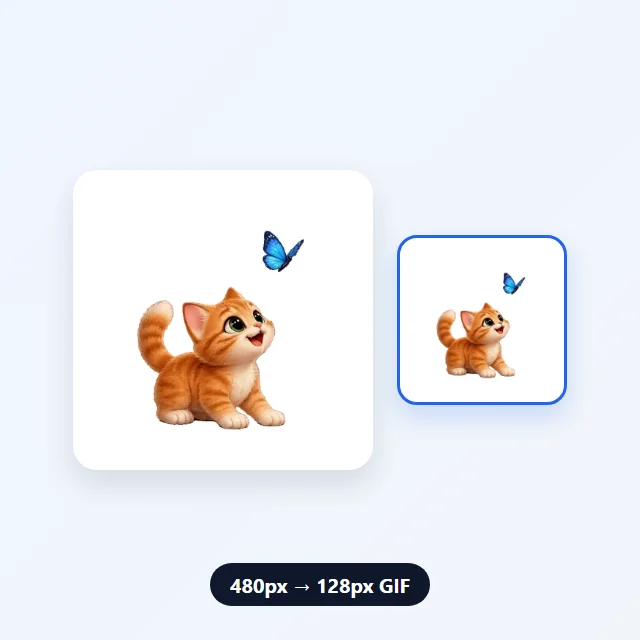
Dial exact pixel targets from 16 px up to 2048 px with live proportional math. Keep Lock aspect ratio enabled to prevent stretching when resizing banners or avatars, or unlock it whenever a layout calls for custom pixel bounds.
Jump directly to 50%, 75%, 128px, 320px, 480px, or 640px in a single click. Whether you need a GIF resizer for Discord animated emojis, compact Slack stickers, or responsive blog embeds, the standard sizes are ready right away.
Ordinary image resizers blend transparent black pixels into bright foreground edges, leaving muddy dark halos around shrunk icons. Our Smooth mode runs exact area-averaged box resampling in premultiplied RGBA so transparent edges stay clean at any size.
Scaling retro sprites with smooth interpolation blurs every hard edge. Switch the studio to Pixel art mode for pure nearest-neighbor sampling with dithering disabled, keeping 8-bit tiles, indie sprites, and pixel emotes razor sharp.
Some resizers flatten variable frame pacing to one fixed speed. Our engine preserves each frame's individual centisecond delay, retains infinite or finite loop headers, and writes clean dispose-2 frames whenever transparency is present.
Because every frame decodes, resamples, and re-encodes inside your browser memory, there are no upload queues or remote copies. Scale animations in seconds, even for confidential product UI demos or unreleased game art.
Five practical tips on choosing pixel widths, picking Smooth versus Pixel art mode, protecting transparency, and keeping resized GIFs light.
Matching native display dimensions prevents browsers and chat apps from blurring your animation on the fly. Use 128 px in this GIF resizer for Discord custom emojis and Slack reactions, 320 px for compact stickers and comments, 480 px for reaction replies and emails, and 640 px for full-column blog tutorials and documentation.
Choose Smooth mode whenever you resize GIF animations made from video, 3D renders, vector UI captures, or anti-aliased illustrations. Switch this animated GIF resizer to Pixel art mode for 16x16, 32x32, or 64x64 pixel-art sprites, especially when enlarging by clean integer multiples like 2x, 3x, or 4x so every pixel block stays uniform.
Transparent pixels often store hidden black RGB values beneath zero alpha. Standard bilinear filters average those invisible black channels into adjacent colored pixels, creating an ugly dark outline when shrinking icons. Premultiplied area averaging weights RGB strictly by pixel opacity so transparent borders remain bright and clean.
Halving a GIF's width and height reduces total pixel count to just one quarter of the original canvas. Running a quick 50% or 480px shrink in our animated GIF resizer often cuts megabytes dramatically before you even touch color reduction or frame dropping in the compressor.
Stretching a 16:9 widescreen animation directly into a 1:1 square distorts circles, faces, and UI text immediately. Leave Lock aspect ratio turned on when you resize GIF online, and if you need a different shape like a square avatar, crop the animation to 1:1 first before scaling to your final pixel target.
Built for Discord server owners, indie game artists, web teams, and social creators matching strict dimension specs.
Use this GIF resizer for Discord and Slack to hit exact 128px square dimensions with crisp transparent cutouts and preserved animation loops.
Upscale tiny 32x32 or 64x64 sprite animations cleanly in Pixel art mode so devlogs, store pages, and portfolios show every crisp pixel without blur.
Standardize oversized screen-capture GIFs down to 480px or 640px so every embed aligns cleanly across article columns and loads swiftly.
Scale pixel dimensions precisely to fit forum avatars, app loading spinners, and social banners while keeping loop timing exact.
Clear answers on scaling modes, pixel limits, transparency, aspect ratio, timing preservation, and privacy.
Yes. You can resize GIF online completely free with no watermarks, no sign-up, and no export cap. Every resized animation builds directly inside your browser and saves cleanly to your device.
Yes. Our engine reads each frame's exact centisecond delay and original loop count from the source file and writes them straight into the resized output so pacing never drifts.
Smooth mode uses premultiplied-alpha area-averaged downscaling and bilinear upscaling with dithering for clean photos and UI graphics. Pixel art mode uses nearest-neighbor sampling with no dithering so game sprites stay blocky and crisp.
Load your animation into this GIF resizer for Discord, click the 128px quick preset with Lock aspect ratio on, and press Update preview. If the file still exceeds Discord's byte cap, pass it straight into our Compress GIF tool.
No. Premultiplied-alpha resampling prevents dark edge halos, and the encoder automatically writes dispose-2 clear frames with a visible-only palette whenever your GIF contains transparent pixels.
Yes. Enter any target width or height up to 2048 px. For crisp pixel-art sprites, select Pixel art mode and choose an exact multiple such as 2x or 4x the original dimensions for distortion-free enlargement.
Shrinking pixel dimensions almost always reduces file size significantly because fewer pixels need to be encoded per frame. For tight byte targets like Slack 128 KB, follow up with our GIF compressor.
No. When you resize GIF online on ImageToPsd.AI, every decoding, scaling, and encoding step executes inside local browser memory, so your files never travel to external servers.
Drop your animation into our free GIF resizer on ImageToPsd.AI for crisp smooth or pixel-art scaling, instant 128px presets, and zero server uploads.
Resize a GIF now