How to Extract Images From PDF Without Losing Quality
How to extract images from PDF without losing quality: lossless DCTDecode JPEG and FlateDecode SMask PNG streams, PDF to vector SVG, and scan deskewing.
 ImageToPsd.AIPublished Nov 25, 2026
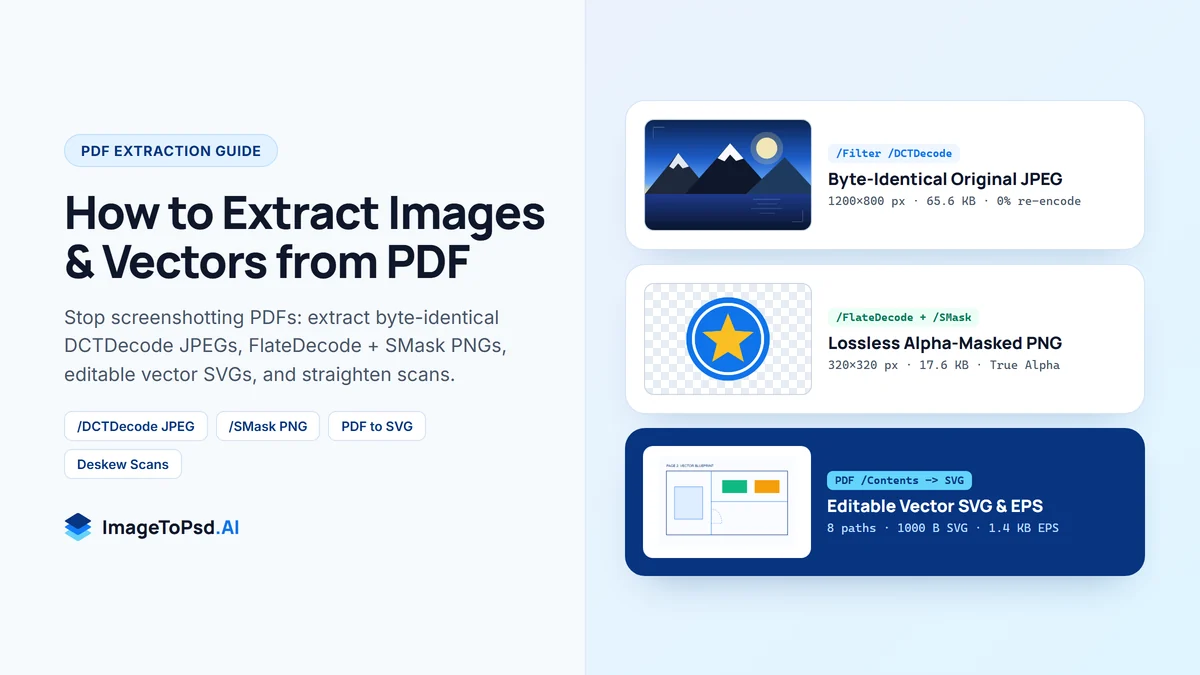
Taking a screenshot is the worst way to save photos or graphics from a brochure, pitch deck, or report. If you want to know how to extract images from PDF without losing quality, the secret is reading the PDF's internal binary objects directly instead of capturing pixels from your screen. Under the ISO 32000 PDF standard, a PDF stores embedded photos as intact /DCTDecode JPEG or /FlateDecode raster XObject streams alongside crisp vector drawing operators. Below we show real measured numbers proving why screenshots destroy detail, how to pull out original photos and alpha-transparent PNGs byte-for-byte, how to convert PDF to editable SVG or EPS, and how to straighten tilted scanned pages.
Short answer: to pull original photos from any document without blur, drop your file into our browser PDF image extractor. It reads /Subtype /Image XObjects locally on your device, passes /DCTDecode JPEGs through byte-for-byte with zero recompression, rebuilds /FlateDecode plus /SMask streams into transparent PNGs, and lets you filter and ZIP every image. If the PDF contains vector logos, charts, or CAD blueprints instead of photos, use PDF to SVG or PDF to EPS.
Why screenshotting ruins PDF image quality (measured proof)
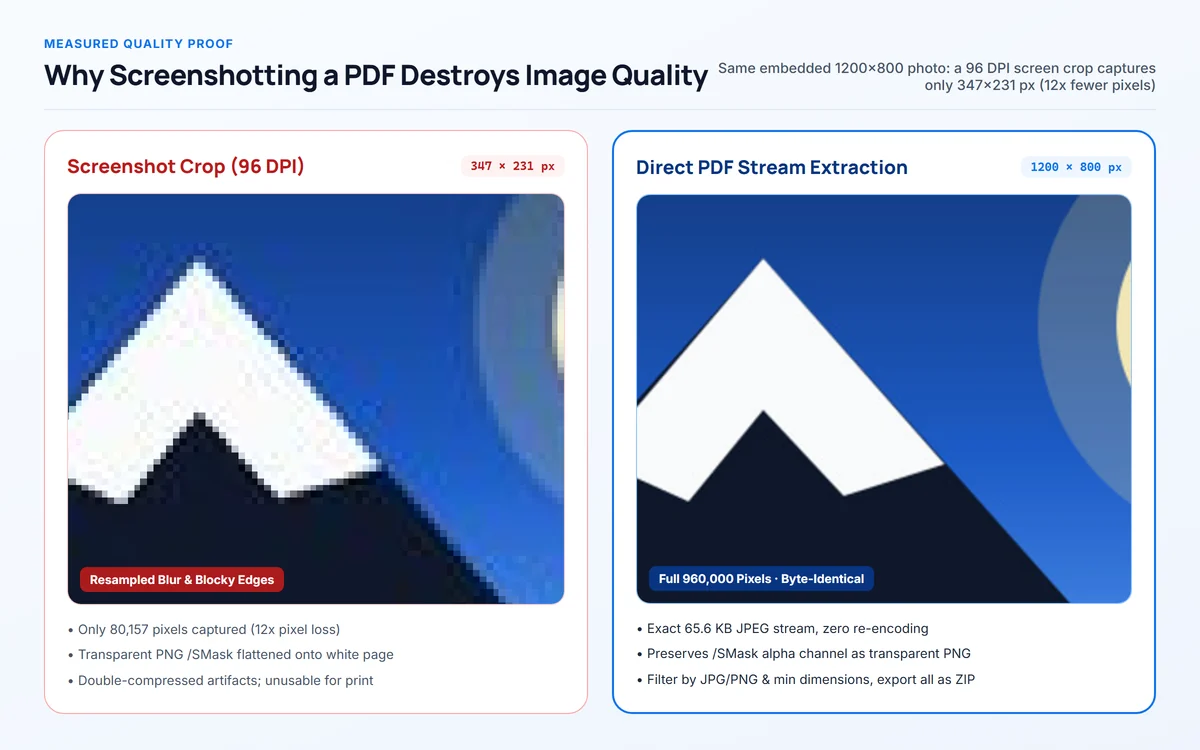
When you view a PDF at 100% zoom on a standard display, your viewer scales a high-resolution embedded photo down to fit its page box in points (1 pt = 1/72 inch). Taking a screen crop captures only those downsampled display pixels, flattens transparent stickers onto the white page background, and recompresses the image a second time.
To measure the exact loss, we built a real 2-page ISO 32000-1 test PDF (82.3 KB) containing a 1200 x 800 px /DCTDecode JPEG photograph placed in a 260 x 173 pt frame, a 320 x 320 px transparent /FlateDecode + /SMask badge, and live vector drawings, then ran both a 96 DPI screenshot crop and our own extractPdfImages engine:
| Method on the same PDF photo | Output dimensions | Total pixels | File size | Transparency & compression |
|---|---|---|---|---|
| 96 DPI screenshot crop | 347 x 231 px | 80,157 px | 7.0 KB (7,182 bytes) | Flattened onto white, double-compressed JPEG |
| Direct Extract Images from PDF | 1200 x 800 px | 960,000 px | 65.6 KB (67,135 bytes) | Byte-identical original JPEG, 0% re-encoding |
Extracted /FlateDecode + /SMask badge |
320 x 320 px | 102,400 px | 17.6 KB (18,048 bytes) | True 8-bit PNG alpha channel intact |
Screenshotting threw away 12x of the original pixels (960,000 vs 80,157), turning crisp architectural lines into blocky stair-steps. By contrast, binary comparison confirmed 0 differing bytes between the original JPEG embedded in the PDF and the .jpg returned by our PDF image extractor.
Inside a PDF: how images and vectors are stored
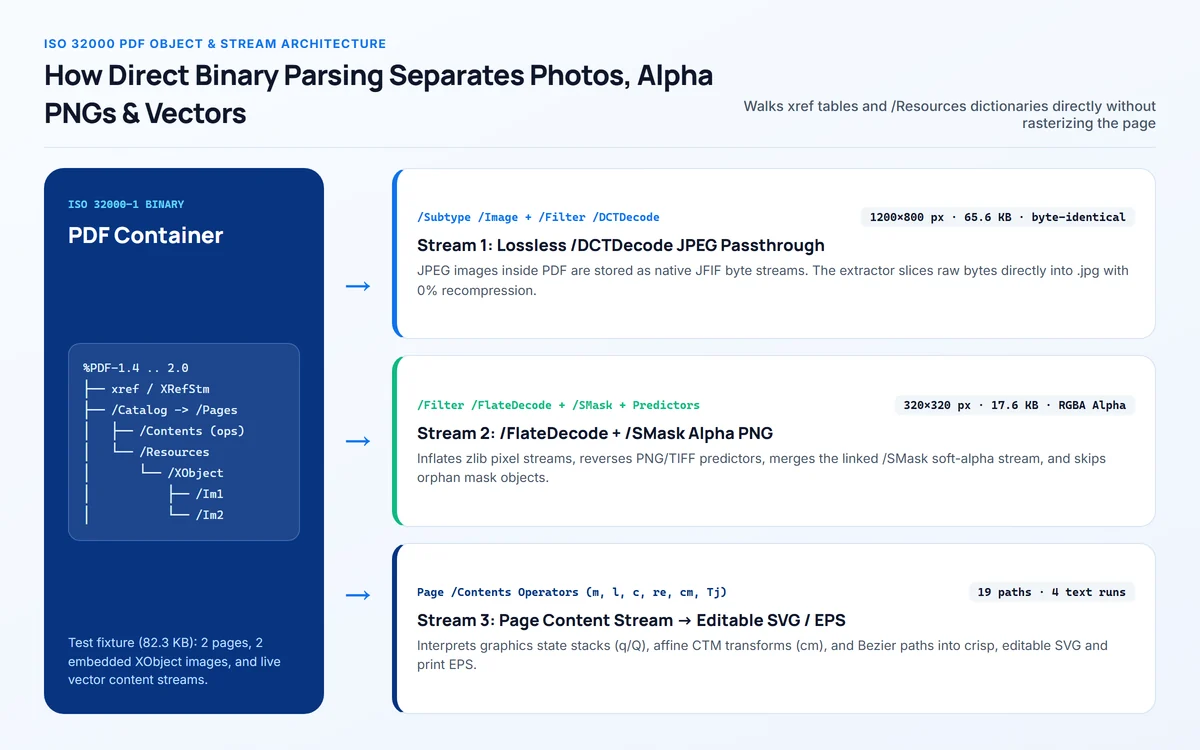
A PDF (application/pdf, registered with IANA) is an indexed container of numbered objects linked through a cross-reference table (xref or PDF 1.5+ /XRef and /ObjStm compressed object streams). Every page references two distinct kinds of artwork:
/DCTDecodeJPEG image streams. When a layout app embeds a JPEG photo, it copies the original JFIF bytes straight into a/Subtype /ImageXObject labeled/Filter /DCTDecode. A lossless binary reader slices those exact stream bytes out (stripping outer transport wrappers such as/ASCII85Decodeif present) without ever decoding or re-encoding the DCT coefficients./FlateDecoderaster streams with/SMaskalpha. Logos, screenshots, and transparent cutouts embedded in PDFs are usually zlib-compressed pixel buffers (/Filter /FlateDecode, often using PNG predictors 10 to 15 or TIFF predictor 2) inDeviceRGB,DeviceGray,DeviceCMYK, orIndexedcolor spaces. Transparency is stored in a separate grayscale stream referenced by/SMask(or a 1-bit/Mask). Our extractor decompresses both streams, reverses predictors, merges the alpha channel into a lossless RGBA PNG, and automatically skips standalone/SMaskobjects so your download folder is never cluttered with black-and-white mask silhouettes.- Page
/Contentsvector operators. Charts, floorplans, icons, and brand logos placed as vectors are not raster images at all. They live as PostScript-like operators (mmoveto,llineto,ccubic Bezier,rerectangle,ffill,Sstroke,cmmatrix transform,BT/Tj/ETtext) inside page content streams and nested/Subtype /FormXObjects.
Step-by-step: save original photos from a PDF in your browser
Follow these four steps whenever you need to pull full-resolution images out of a PDF on Windows, Mac, Linux, or mobile:
- Open Extract Images from PDF in your browser. Everything parses locally in JavaScript with zero server uploads, supporting files up to 80 MB.
- Drop one or multiple PDF files into the workspace. The engine walks every page's
/Resources /XObjecttree (including nested/Subtype /Formcontainers) and lists every embedded raster asset with its page number, exact pixel dimensions, filter (DCTDecodeorFlateDecode), and byte size. - Filter out tiny icons or pick one format. Brochures often embed tiny 24 px bullet icons alongside 2000 px product photos. Filter by JPG or PNG, or set a minimum dimension threshold (
>= 100 pxor>= 400 px) to select only full-size assets. - Download individually or as one ZIP. Save a single photo with one click, or bundle every selected image into a neatly named ZIP archive with page numbers preserved.
How to convert PDF to editable SVG or print EPS
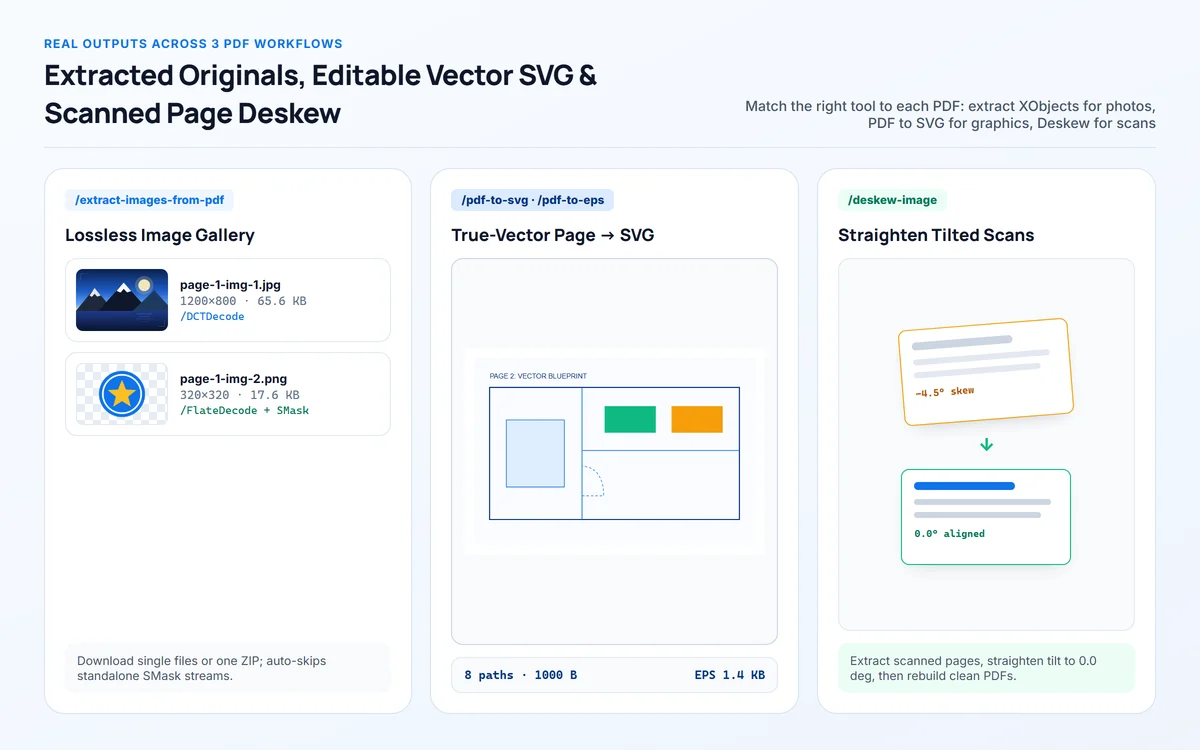
What if you inspect a brand guideline sheet or architectural blueprint and zero photos appear, or only a tiny seal shows up? That means the diagrams, icons, and logos are true PDF vectors stored in /Contents rather than raster XObjects.
To convert PDF to editable SVG without manual tracing:
- Open PDF to SVG (accepts files up to 50 MB locally in your browser) and drop your PDF.
- Inspect vector telemetry per page. On Page 2 of our real test PDF (a pure vector blueprint), our engine translated every rectangle, dashed door-swing Bezier arc, and label into 8 clean
<path>elements and 1<text>run totaling 1,000 bytes of spec-valid SVG. On Page 1 (mixed layout), it extracted 11 vector paths, 3 text runs, and both embedded XObject images. - Configure options before download:
- Decimal precision (1, 2, or 3): keep
2for clean Figma or Illustrator imports, or3for engineering schematics. - Include Text & Include Images: toggle off embedded raster images when you only want pure vector linework, or keep both for complete slide recovery.
- Transparent vs White background: choose transparent to drop extracted charts or logos directly onto colored slides.
- Decimal precision (1, 2, or 3): keep
- Export SVG, multi-page ZIP, or print EPS. Download the active page as
.svg, bundle all pages in a ZIP, or convert directly to CMYK/RGB PostScript with PDF to EPS (on Page 2 of our test PDF, the matching CMYK EPS measured 1,444 bytes).
Working with scanned PDFs: extract, straighten, and rebuild
Scanned contracts, receipts, and archival books are a special case: each page usually contains one full-page raster XObject (either /DCTDecode JPEG or 1-bit/grayscale /FlateDecode). Because physical paper feeds through scanners at a slight tilt, extracted scan pages often lean by 1 to 5 degrees.
Here is the clean browser workflow for scanned PDFs:
- Pull out the raw scan pages at native scanner DPI using Extract Images from PDF.
- Straighten tilted pages with Deskew Image so text baselines align horizontally to
0.0degrees before OCR, archiving, or reprinting. - Rebuild a clean PDF once pages are cropped and deskewed by combining the straightened images back together with PNG to PDF (or converting layered design proofs into multi-page PDFs with PSD to PDF).
Quick decision table: which PDF tool fits your file?
| What is inside your PDF | Best tool to use | What you get |
|---|---|---|
| Product photos, brochure shots, transparent PNG badges | Extract Images from PDF | Original /DCTDecode JPGs and /FlateDecode + /SMask PNGs |
| Vector logos, charts, CAD floorplans, diagrams | PDF to SVG | Editable <path> SVG per page (or ZIP) for Figma and browsers |
| Vector PDF needed for legacy offset print or vinyl plotters | PDF to EPS | True-vector PostScript Level 2 EPSF-3.0 |
| Crooked scanned PDF pages | Extract Images from PDF + Deskew Image | Straightened high-res page images ready for OCR or PNG to PDF |
FAQ
How do I save original photos from a PDF with zero quality loss?
Use a binary Extract Images from PDF tool instead of taking screenshots. It reads the PDF's /Subtype /Image XObjects directly, exporting /DCTDecode streams as byte-identical JPEGs and /FlateDecode streams (with /SMask transparency) as lossless PNGs at full original resolution.
Why did the extractor skip some logos or charts in my PDF?
Logos, charts, bar graphs, and CAD drawings created in Illustrator, Figma, or CAD software are stored as mathematical vector paths inside the page /Contents stream rather than embedded raster images. To extract those cleanly, open the same document in PDF to SVG for a true PDF to vector SVG conversion.
Why do some extracted PDF images look like black-and-white silhouettes in other tools?
PDF stores transparency for raster graphics in a separate grayscale /SMask XObject. Basic tools dump every image stream blindly, giving you one RGB image and one confusing grayscale mask file. Our browser Extract Images from PDF engine tracks /SMask references automatically, merges the alpha channel into a single transparent PNG, and hides the orphan mask.
Can I extract images from a PDF on Windows, Mac, or phone without uploading private files?
Yes. Both Extract Images from PDF and PDF to SVG run completely inside your browser with zero server upload, making them safe for contracts, financial decks, and unpublished brand catalogs on Windows, macOS, iOS, and Android.
What should I do if my PDF is a scanned document where every page is skewed?
First pull out the native full-page scans with Extract Images from PDF, straighten the tilt in Deskew Image, and then repackage the clean pages into a fresh PDF using PNG to PDF.
Next steps
Stop cropping blurry screenshots from PDFs. Try our browser PDF image extractor to extract images from PDF without losing quality in seconds, or open PDF to SVG and PDF to EPS whenever you need to convert PDF to editable SVG or print-ready vector artwork.