How to Open PSB File Without Photoshop (PSB vs PSD Guide)
Learn how to open PSB file without Photoshop in your browser. Compare PSB vs PSD 64-bit specs, inspect layers, and convert PSB to JPG, PNG, or PDF locally.
 ImageToPsd.AIPublished Nov 28, 2026
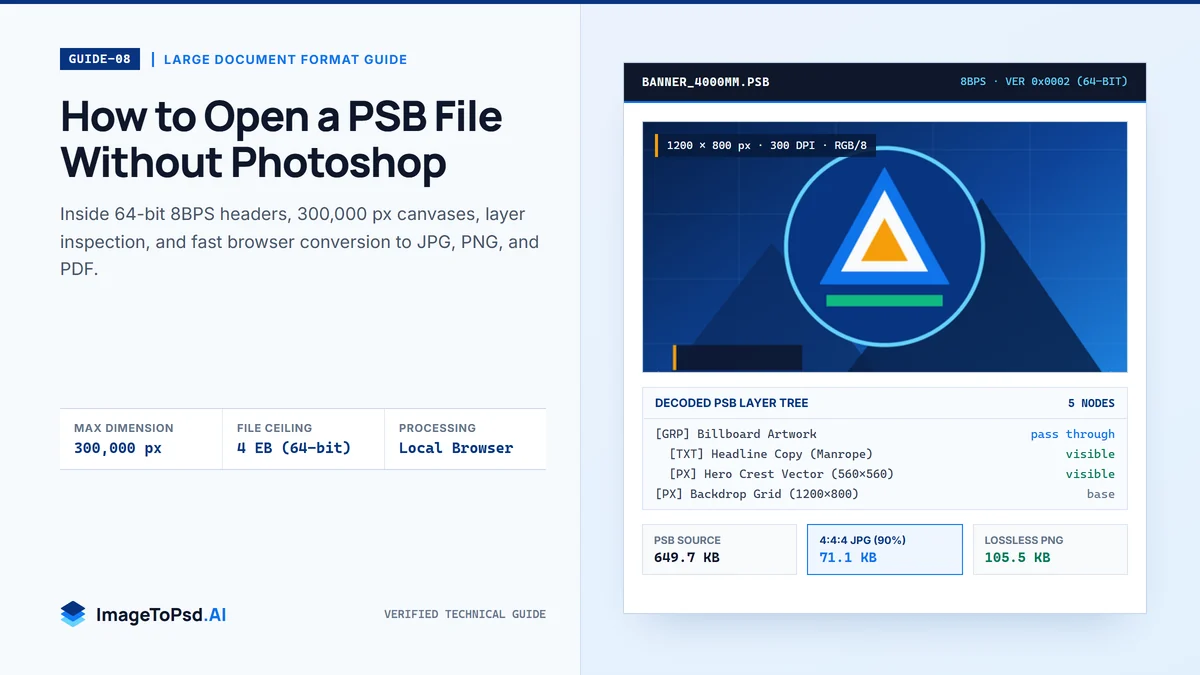
Receiving an oversized .psb billboard file, panoramic render, or 16-bit product master when you do not have Adobe Photoshop installed immediately raises a practical question: how to open PSB file archives safely without paying for a full creative suite or uploading gigabytes of confidential client artwork to a remote server. Unlike standard image formats such as JPEG or PNG, a PSB (Photoshop Big, officially Photoshop Large Document Format) wraps multi-layer pixel buffers, alpha masks, vector shapes, and font metadata inside a 64-bit binary container that Windows Photos, macOS Preview, and mobile photo galleries cannot decode. In this engineering guide, we explain the exact binary mechanics of PSB vs PSD, walk through how to open PSB file without Photoshop on Windows, macOS, and mobile browsers, and share real byte benchmarks measured on our own binary parser and encoders.
Short answer: the fastest way to open PSB file without Photoshop is to drop the .psb into our local browser PSD Viewer on ImageToPsd.AI. Because our pure-TypeScript binary reader decodes both 32-bit PSD (version 1) and 64-bit PSB (version 2) headers directly in your browser RAM with zero server upload, you can inspect the layer tree, toggle visibility, read embedded text strings, and immediately export via PSD to JPG, PSD to PNG, or PSD to PDF. If you also need full offline pixel retouching on a multi-gigabyte canvas, desktop applications such as GIMP, Krita, or Affinity Photo can edit PSB layers natively after installation.
PSB vs PSD: understanding the 64-bit binary format
To troubleshoot why a file opens in one tool and fails in another, you need to understand what separates PSB vs PSD inside the file header. Both formats begin with the exact same 4-byte ASCII signature 8BPS (hex 38 42 50 53), documented in the Library of Congress Digital Preservation Archive (FDD000678) alongside standard PSD. Immediately after that 4-byte magic signature sits a 2-byte big-endian version integer: 0x0001 declares a classic 32-bit PSD, while 0x0002 declares a 64-bit PSB Large Document.
That single 2-byte version bump changes how offsets, section sizes, and RLE scanline tables are laid out across the entire file:
| Technical specification | Standard PSD (.psd) | Large Document PSB (.psb) | Practical production impact |
|---|---|---|---|
| Binary header magic and version | 8BPS + 0x0001 |
8BPS + 0x0002 |
Legacy viewers check for == 1 and reject PSB immediately |
| Maximum canvas dimensions | 30,000 x 30,000 px | 300,000 x 300,000 px | Essential for trade show walls, 360 panoramas, and murals |
| Maximum file size ceiling | 2 GB (32-bit signed limit) | 4 EB (4 exabytes, 64-bit) | Prevents save failures on deep 16-bit layered composites |
| Section and layer length fields | 4-byte unsigned integers | 8-byte unsigned integers | Requires a 64-bit parser for Layer and Mask Information |
| PackBits RLE row byte counts | 2-byte uint16 per row |
4-byte uint32 per row |
Supports scanlines wider than 65,535 compressed bytes |
| Color depth and spaces | 1, 8, 16, 32-bit; RGB, CMYK, Lab | 1, 8, 16, 32-bit; RGB, CMYK, Lab | Identical color model support and layer blend modes |
A subtle engineering detail explains why an identical 4-layer file is slightly larger as a PSB than as a PSD. Because every length marker for the Layer Information section, every channel data block, and every PackBits RLE scanline counter doubles in byte width (from 4 bytes to 8 bytes, or from 2 bytes to 4 bytes), a small 1200 x 800 px 4-layer artwork measures 665,257 bytes (649.7 KB) in .psb format versus 644,677 bytes (629.6 KB) in .psd format on our benchmark. Once a file crosses 2 GB or exceeds 30,000 px on either side, Photoshop refuses to write a .psd at all and requires .psb.
Why Maximize Compatibility (Image Resource 1057) matters
When Photoshop saves a .psd or .psb with Maximize Compatibility turned on, it writes a flattened composite bitmap at the end of the file and sets the hasRealMergedData boolean inside Image Resource ID 1057 (Version Info). Many lightweight previewers never parse individual layers at all; they only read that trailing composite image. If a designer turned Maximize Compatibility off to save disk space, the trailing composite is replaced by a blank placeholder warning graphic. A proper PSB file viewer inspects Resource 1057, detects missing or blank merged data, and rebuilds the composite directly from individual layer pixel buffers, opacities, and masks.
Step-by-step: how to open PSB file without Photoshop in your browser
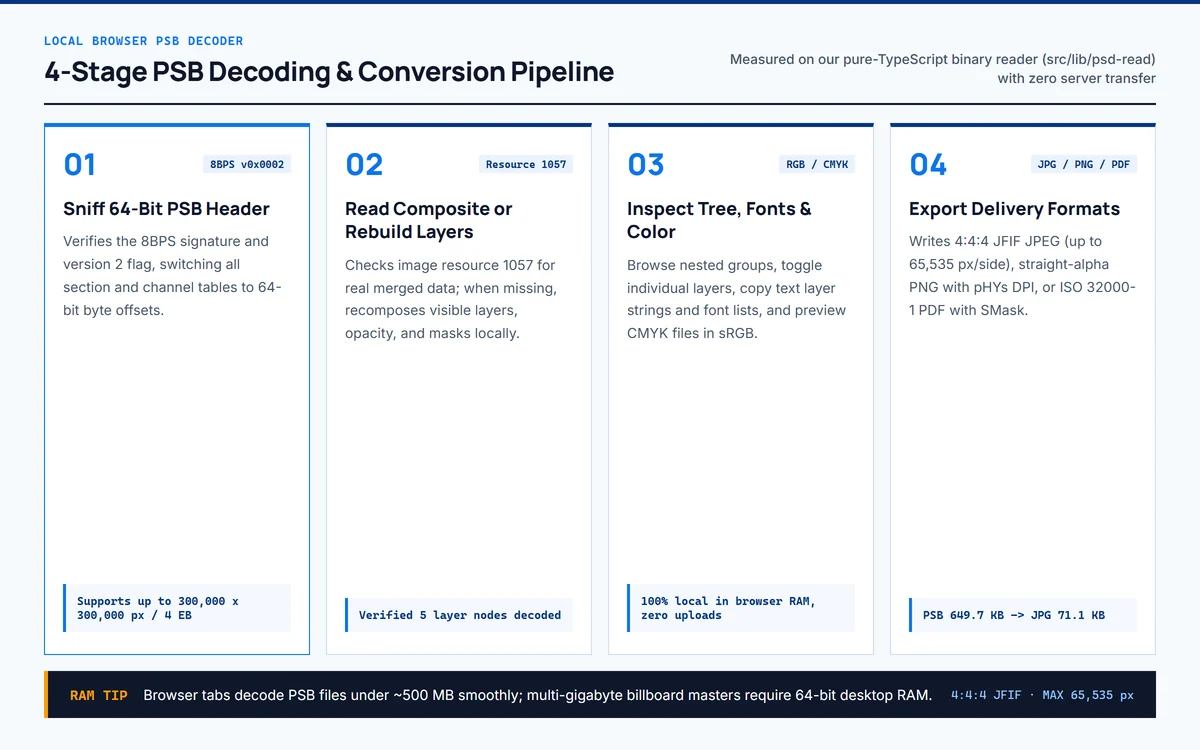
Modern browser engines handle 64-bit binary decoding locally in JavaScript and Web Workers, letting you open PSB file without Photoshop on Windows, macOS, Chromebook, iPad, or smartphones without installing gigabytes of desktop software.
Step 1: Load your .psb into a local browser viewer
Navigate to our browser PSD Viewer on ImageToPsd.AI and drop your .psb file into the canvas area. Your file stays completely on your machine: nothing is transmitted to a cloud server, which protects unreleased packaging mockups, architectural elevations, and agency brand masters. The reader checks bytes 0 through 5 for 8BPS (38 42 50 53) and version 00 02, then extracts canvas dimensions, resolution (horizontal and vertical PPI), bit depth, and color mode (RGB, CMYK, Grayscale, Indexed, or Bitmap).
Step 2: Inspect the layer hierarchy, text copy, and font inventory
Once decoded, expand the layer panel to verify every nested group (pass through or normal), pixel layer, vector fill, smart object, and text layer. You can toggle individual layers on or off to check hidden alternates, background plates, or trim marks without permanently altering the source .psb. For print and marketing reviewers who just need to proof copy or check typography, the inspector surfaces text layer content (up to 2,000 characters per layer) and compiles a sorted list of embedded PostScript font names (for example, Manrope-Bold) so you can verify missing fonts before sending the job to press.
Step 3: Check color mode and non-standard layer approximations
Production PSB files built for large-format signage frequently use 8-bit CMYK color space, adjustment layers, or Photoshop-only smart filters. When opening a CMYK PSB in an sRGB browser monitor, our viewer flags approximate screen color conversion cleanly rather than failing outright, and also alerts you if visible layers depend on unsupported adjustment stacks or feathered vector masks. If the source PSB was saved with Maximize Compatibility enabled and you have not toggled any layer visibility, the viewer displays Photoshop's exact baked merged image pixel-for-pixel so gradients, drop shadows, and adjustment curves look authentic.
Step 4: Export to JPG, PNG, PDF, or per-layer assets
After confirming the artwork looks right, pick the delivery format that matches your next workflow:
- Fast stakeholder approvals and email previews: use PSD to JPG to convert PSB to JPG with our custom 4:4:4 JFIF encoder (supporting outputs up to 65,535 px per side, far beyond the 16,384 px browser
<canvas>cap). Unlike standard 4:2:0 subsampled JPEGs that blur red or blue headline typography, 4:4:4 chroma preservation keeps small lettering razor sharp while embedding the original document DPI in the JFIF header. - Transparent overlays and web production: use PSD to PNG to write a straight-alpha lossless PNG with an exact
pHYsDPI chunk, or export visible layers individually into a folder-structured ZIP archive directly from our online viewer. - Print proofs and client sign-off packets: use PSD to PDF to wrap the artwork inside a standards-compliant ISO 32000-1 PDF at original print dimensions, A4, or US Letter, preserving alpha transparency through a Flate-compressed
/SMaskstream whenever transparent margins exist. - Scalable vector handoff: when your PSB contains crisp shape layers or graphic marks, send it through PSD to SVG to inspect or export clean vector markup.
Windows, Mac, and mobile: best ways to open large Photoshop documents
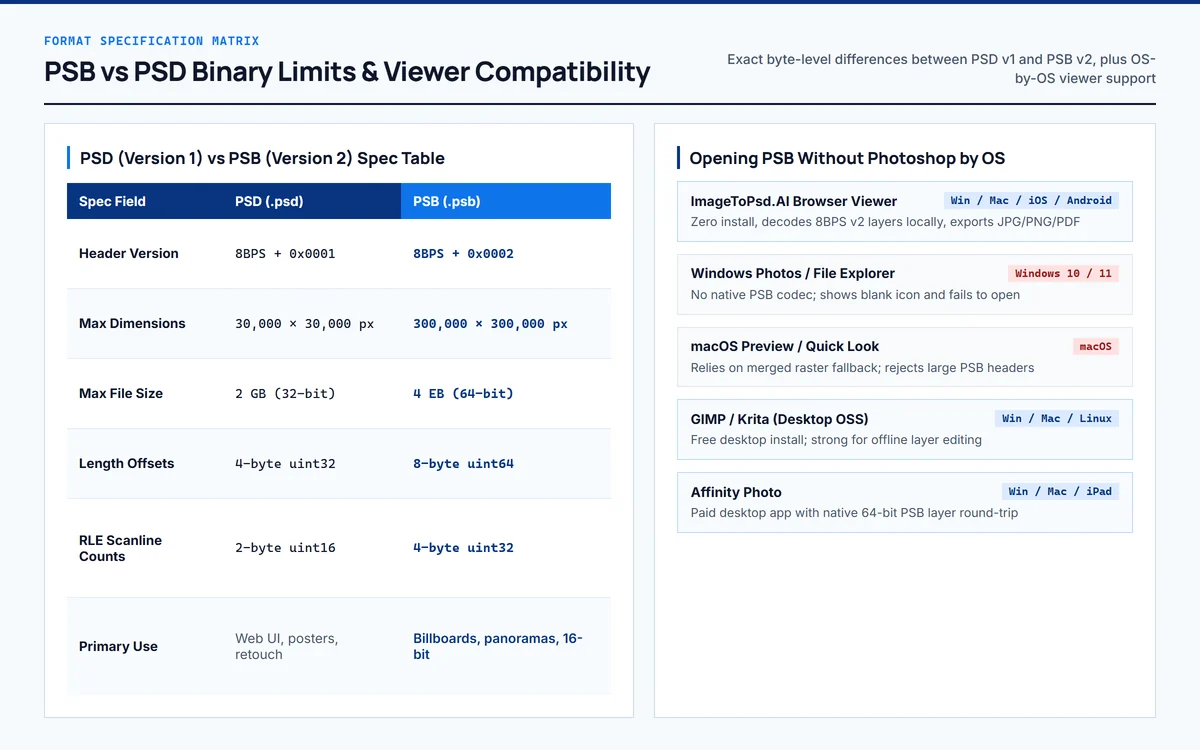
Not every operating system or graphics program handles 64-bit PSB headers reliably. The table below compares real-world behavior across common platforms when deciding how to inspect .psb archives quickly:
| Solution | Operating systems | Install required | Reads 64-bit PSB layers | Best practical use case |
|---|---|---|---|---|
| ImageToPsd.AI Browser Viewer | Windows, Mac, Linux, iOS, Android | None (runs in browser) | Yes (8BPS v2 + Resource 1057) | Instant inspection, layer toggling, JPG/PNG/PDF export |
| Windows Photos and File Explorer | Windows 10, Windows 11 | Built in | No | Cannot preview or open .psb natively |
| macOS Preview and Quick Look | macOS | Built in | Partial (composite only, often fails) | Unreliable on large PSB canvases or unmerged files |
| GIMP 2.10+ / 3.0 | Windows, Mac, Linux | Free desktop install | Yes (most blend modes) | Offline open-source retouching and manual re-export |
| Krita | Windows, Mac, Linux | Free desktop install | Partial (raster layers) | Digital painting workflows and flat layer checks |
| Affinity Photo | Windows, Mac, iPad | Paid desktop install | Yes (64-bit round-trip) | Commercial multi-gigabyte editing without subscription |
| Adobe Photoshop | Windows, Mac | Paid subscription | Full native reference | Editing complex smart filters, 3D, and 16-bit CMYK |
How to inspect a PSB archive on Windows 10 and Windows 11
Windows ships without a native Adobe 8BPS codec, so .psb files show a generic white icon in File Explorer and trigger an unsupported format warning in the Photos app. For quick visual checks, layer extraction, or exporting a lightweight JPEG for a colleague, drag the file into Chrome or Edge running our browser viewer. If your PSB is larger than 1 GB and requires heavy multi-layer compositing or retouching on Windows, install GIMP or Affinity Photo on a 64-bit machine with at least 16 GB of RAM and ample scratch disk space.
How to view a PSB archive on Mac
While macOS Preview can sometimes display small standard .psd files that include a merged composite, Preview frequently throws a corruption error or renders a blank white page on .psb files because Apple's built-in image framework was not built for 64-bit 0x0002 channel offset tables. Opening the file in Safari or Chrome via our PSB File Viewer bypasses the OS limitation completely, and exporting through PSD to PDF immediately gives you a file that macOS Preview and Quick Look open natively with Spacebar.
Browser RAM limits vs multi-gigabyte billboard PSB files
Because browser tabs enforce per-tab memory ceilings (typically 2 GB to 4 GB on desktop Chrome and 500 MB to 1 GB on mobile Safari), understanding raw decoded RAM math saves frustration. A 30,000 x 15,000 px RGB 8-bit composite takes 30,000 * 15,000 * 4 bytes = 1.8 GB uncompressed in RGBA memory before counting individual layers. Browser viewing works smoothly for .psb files up to roughly 300 MB to 500 MB on desktop computers (and under 100 MB on phones). If a print vendor sends a 3.5 GB, 80,000 px billboard master, ask them for a flattened proof PDF or open the master inside a 64-bit desktop editor with dedicated scratch memory.
Real binary header inspection and export weight benchmarks
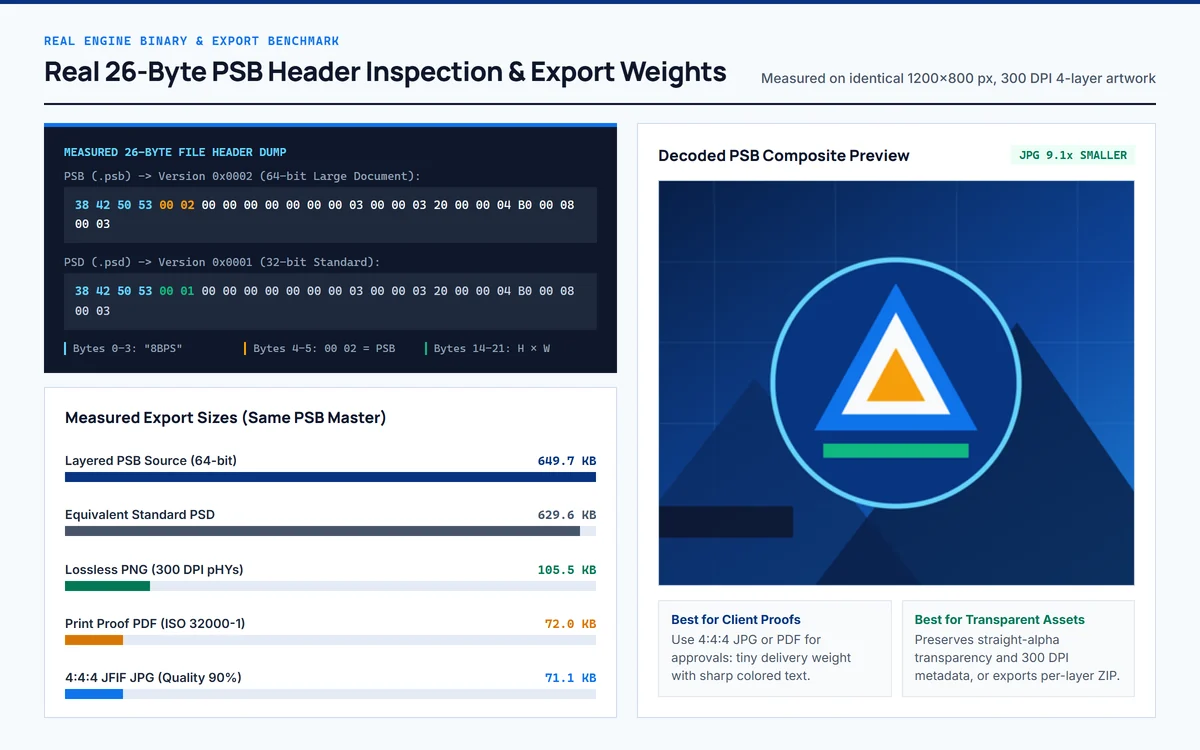
To demonstrate the concrete format difference and the storage savings you get when exporting to JPG, PNG, or PDF, we generated an authentic 4-layer, 300 DPI exhibition banner fixture (1200 x 800 px, nested group, transparent vector emblem, trim overlay, and Manrope-Bold text layer) using ag-psd in both 64-bit PSB (psb: true) and 32-bit PSD modes, then decoded the .psb through our production src/lib/psd-read engine:
| Format and encoder settings | Measured file size | Ratio vs PSB source | Key technical traits |
|---|---|---|---|
Original 4-layer PSB (8BPS 0x0002) |
649.7 KB (665,257 bytes) | 1.0x baseline | 64-bit section lengths, 4-byte RLE row counts, full layers |
Identical 4-layer PSD (8BPS 0x0001) |
629.6 KB (644,677 bytes) | 1.03x smaller | 32-bit offsets, capped at 30,000 px and 2 GB |
Lossless PNG (encodePng, 300 DPI pHYs) |
105.5 KB (108,040 bytes) | 6.2x smaller | Exact straight-alpha pixels, zero compression artifacts |
Print Proof PDF (buildPdf, ISO 32000-1) |
72.0 KB (73,686 bytes) | 9.0x smaller | Embedded 300 DPI page box (288 x 192 pt), universal view |
4:4:4 JFIF JPG (jpegOf, quality 90%, 300 DPI) |
71.1 KB (72,850 bytes) | 9.1x smaller | Full chroma resolution for crisp text, no canvas size cap |
Inspecting the first 26 bytes of both binary files confirms the exact header layout:
- PSB header hex:
38 42 50 53(8BPS) |00 02(version 2) |00 00 00 00 00 00(6 reserved bytes) |00 03(3 channels) |00 00 03 20(height 800) |00 00 04 B0(width 1200) |00 08(8-bit) |00 03(RGB color mode). - PSD header hex: identical across 25 of 26 bytes, changing only byte 5 from
02to01.
When you only need to send a visual review copy to a client or upload a product preview to a CMS, converting a heavy .psb to a 90% 4:4:4 JPEG cuts file weight by 9.1x on a small 4-layer test file and frequently by 30x to 100x on deep 40-layer agency files. Conversely, if you have a flattened billboard image or poster graphic and need to rebuild editable Photoshop layers from scratch, our AI-powered Image to PSD and lossless PNG to PSD tools work in the opposite direction.
Common troubleshooting issues when opening PSB files
- The file opens as a blank white or text-warning canvas. That happens when the author saved the
.psbwith Maximize Compatibility disabled. A basic previewer only shows the blank stand-in bitmap. Load the file in our online PSD/PSB tool, which inspects Image Resource1057, ignores the dummy composite, and reconstructs the artwork from the underlying layer stack. - Colors look duller or slightly shifted compared to print proofs. Commercial billboard PSB files often live in CMYK (color mode
4) with a custom ICC profile such as FOGRA39 or SWOP. Web browsers operate in sRGB; formula-based CMYK-to-RGB conversion is accurate for layout and copy inspection, while final color grading should be verified against a calibrated CMYK proof. - Browser tab runs out of memory on a 2 GB+ file. Decompressing a 16-bit, 50,000 px wide PSB with dozens of full-bleed layers can require more RAM than a single browser process permits. For files above ~500 MB, open in a 64-bit desktop application or request a flattened preview exported at 150 DPI.
- Unsupported Lab, Duotone, or 16-bit CMYK error. Some specialized prepress PSB documents store channels in CIE Lab (mode
9), Duotone (mode8), or 16-bit CMYK. Ask the sender to convert a review copy to 8-bit RGB or export an ISO PDF before sharing outside Photoshop.
Frequently Asked Questions (FAQ)
How to open PSB file without Photoshop for free?
Drag your .psb directly into the ImageToPsd.AI PSD Viewer. It runs locally inside Chrome, Edge, Safari, or Firefox with zero server upload, reads 64-bit 8BPS version 2 headers natively, lets you inspect and toggle layers, and exports to JPG, PNG, or PDF right away.
What is the difference between PSB vs PSD?
In a direct comparison of PSB vs PSD, both formats preserve identical Photoshop layers, masks, smart objects, and color depths, but PSD uses 32-bit internal pointers capped at 30,000 x 30,000 px and 2 GB, whereas PSB uses 64-bit pointers supporting canvases up to 300,000 x 300,000 px and file sizes up to 4 exabytes.
Can I convert PSB to JPG or PNG without losing text sharpness?
Yes. Upload your .psb to PSD to JPG to export with 4:4:4 chroma subsampling (preventing color bleed around colored text and fine UI lines) at up to 65,535 px per side, or choose PSD to PNG when you need lossless pixels and transparent alpha backgrounds.
Why will Photoshop not let me save my file as a regular PSD?
Photoshop disables the .psd option automatically whenever either canvas dimension exceeds 30,000 pixels or the uncompressed + compressed file payload exceeds 2 GB. Saving as .psb (Large Document Format) is the standard workaround; you can later save a flattened JPEG or PDF for easy sharing.
Can I view a PSB archive on iPhone or Android?
Yes, provided the file fits comfortably within mobile browser memory (generally under 80 MB to 100 MB). Open Safari or Chrome, visit our browser viewer, pick the .psb from your Files app, preview the composite or individual layers, and save a lightweight JPG or PNG to your camera roll.
Does a browser PSB file viewer upload my confidential design files to a server?
No. ImageToPsd.AI parses .psb and .psd files completely inside client-side browser memory using pure TypeScript and Web Workers. Your pixels and text layers never leave your device, making it safe for NDA agency deliverables, unreleased product launches, and legal signage proofs.
How can I convert a flattened image back into a layered Photoshop file?
If someone only sent you a flattened JPG or PNG instead of the original layered file, run it through Image to PSD to separate the foreground subject, typography, and background into editable Photoshop layers, or use PNG to PSD for instant lossless wrapping.
Next steps
Need to inspect a large Photoshop master right now? Open our zero-upload PSB File Viewer to see how to open PSB file without Photoshop in seconds, check nested layers and fonts locally, and immediately export via PSD to JPG, PSD to PNG, or PSD to PDF with exact DPI preservation.