How to Make Secret Santa Cards & Printable QR Gift Tags
Learn how to make Secret Santa cards, printable Secret Santa draw slips, host-blind QR code cards, and DIY Secret Santa tags at 300 DPI without email signups.
 ImageToPsd.AIPublished Nov 29, 2026
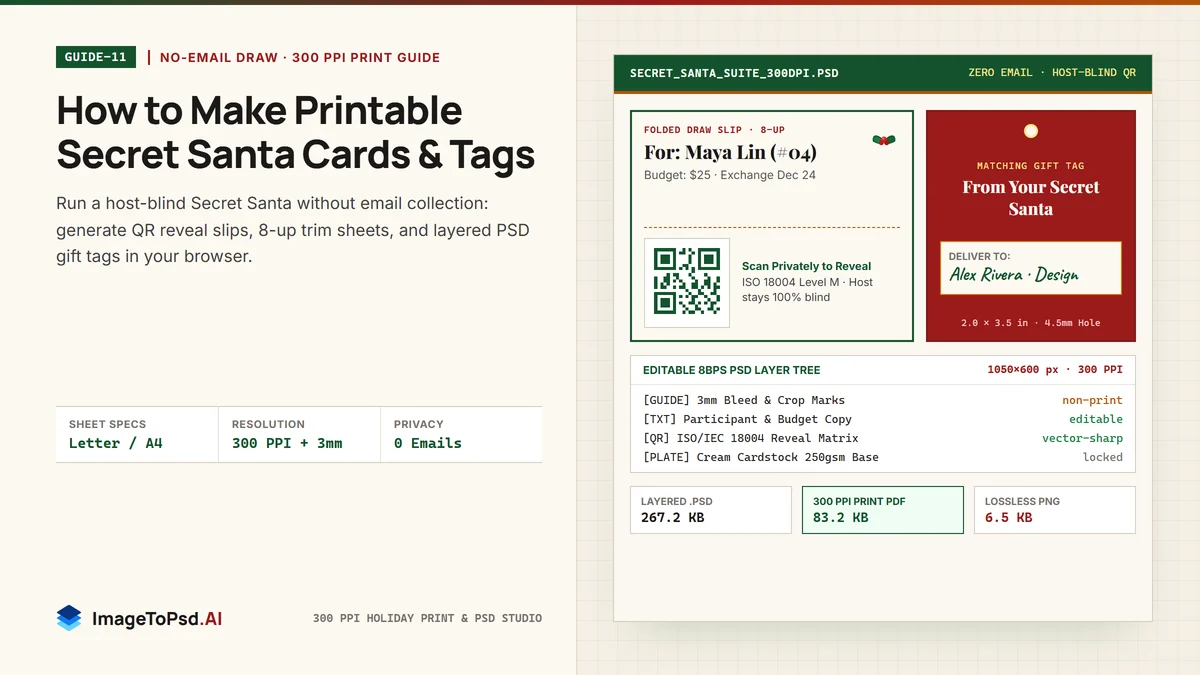
Organizing an office, classroom, or extended family gift exchange quickly stalls when guests refuse to hand over personal email addresses to ad-heavy signup portals or when crumpled paper scraps pulled from a winter beanie end in awkward self-draws. Learning how to make Secret Santa cards that combine mathematical exclusion rules, host-blind scannable reveal codes, and press-ready holiday stationery solves both problems in minutes. Instead of forcing twenty coworkers to create accounts or manually policing couples who should not draw each other, you can run a complete Secret Santa without email directly in your browser, print crisp 8-up folded reveal slips on opaque cardstock, and pair every wrapped box with coordinated holiday gift tags and editable .psd layer masters.
Short answer: the cleanest way to run a private holiday gift draw without collecting a single email address is to enter your participant list and household exclusions into the browser-based Secret Santa Generator on ImageToPsd.AI, export 300 PPI Secret Santa QR code cards or folded printable Secret Santa draw slips formatted for US Letter or ISO A4 cardstock, and print coordinated Printable Gift Tags with crop marks and punch-hole guides. If you also want to customize typography, metallic foil borders, or background plates in Adobe Photoshop, convert any flat holiday artwork into clean layers with Image to PSD and inspect every channel locally in our PSD Viewer.
Why printable Secret Santa draw slips and QR cards beat email portals
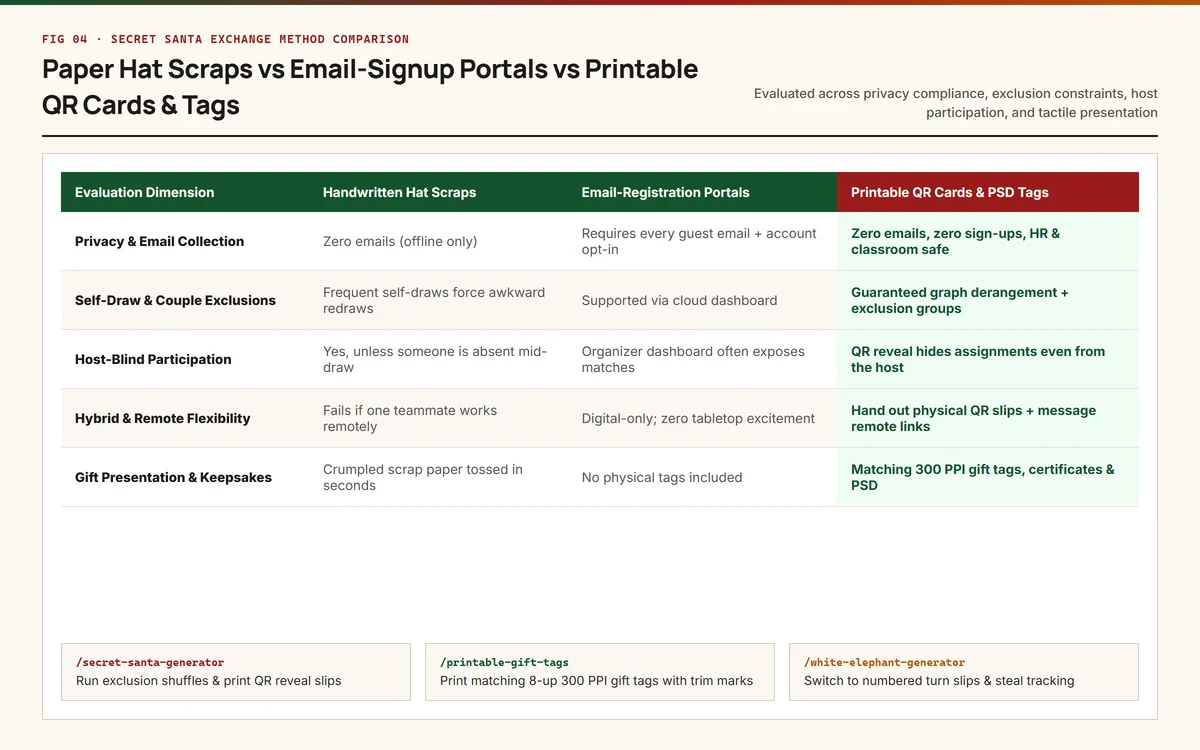
Most holiday organizers assume they have to choose between two flawed extremes: old-fashioned paper scraps in a bowl or a cloud registration site that harvests guest contact details. Understanding where both approaches break down clarifies why local print-ready decks work so smoothly for in-person, classroom, and hybrid groups:
| Exchange method | Email or account required | Couple & self-draw protection | Can the host play blind? | Tactile party presentation |
|---|---|---|---|---|
| Handwritten paper hat scraps | None (100% offline) | None; frequent redraws when guests pull their own name | Yes, unless one guest is absent | Torn notebook paper discarded immediately |
| Cloud email-signup portals | Mandatory email or phone for every player | Supported on remote server | Often spoiled on admin dashboard | Digital inbox link only; zero table stationery |
| Folded cardstock draw slips | None (zero inbox collection) | Guaranteed local graph derangement | Partial (host folds sealed tabs) | Coordinated 300 PPI cardstock slips |
| Scannable QR reveal cards + gift tags | None (zero personal data uploaded) | Full household and team exclusions | 100% host-blind (QR hides text) | Scannable keepsake cards + matching tags |
Running a Secret Santa without email is especially helpful in three everyday settings:
- Corporate departments and schools: HR privacy policies and student data rules discourage uploading employee or classroom rosters to third-party marketing databases. Local browser generation keeps every name inside device RAM.
- Multi-generational family dinners: Grandparents, kids, and cousins rarely check the same messaging app, yet everyone has a smartphone camera ready to scan Secret Santa QR code cards passed around the dessert table.
- Hosts who want to play too: When you print plain-text slips, whoever cuts the sheet sees every pairing. Encoding each match into a scannable matrix means the organizer can cut, shuffle, and hand out cards while keeping their own draw a complete surprise.
Step-by-step: how to make Secret Santa cards and QR reveal sheets
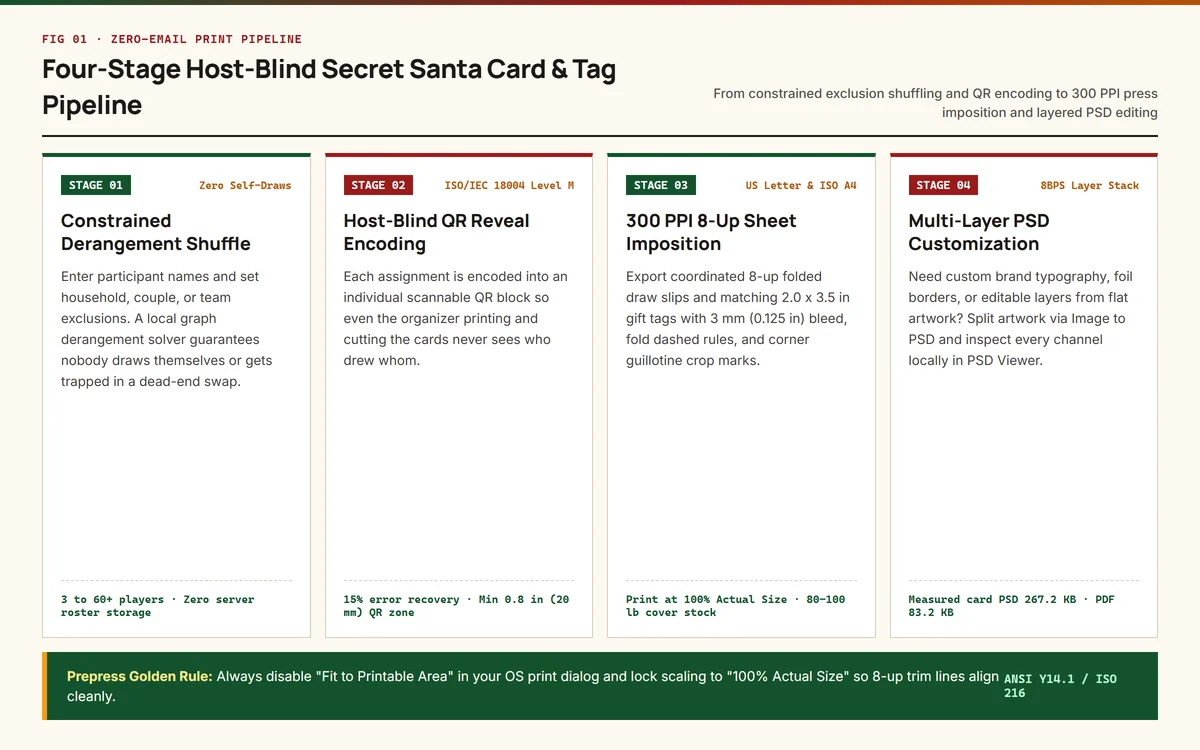
Follow this four-stage studio workflow whenever preparing holiday exchange decks that cut cleanly, scan on the first try, and never spoil the mystery.
Step 1: Build a zero-self-draw roster with exclusion groups
Open the Secret Santa Generator and add participant names, spending cap (for example, $25), and exchange date. Before locking the draw, assign exclusion pairs or household groups so spouses, roommates, or direct manager-report pairs never draw one another. Under the hood, a constrained graph derangement solver searches for a valid Hamiltonian cycle or disjoint permutation where giver[i] != receiver[i] and every forbidden edge is excluded. Unlike pulling handwritten paper strips from a hat (where the final person frequently pulls their own name and forces everyone to start over), every card on your sheet is mathematically verified before a single drop of ink hits paper.
If your group prefers a lively Yankee Swap or steal-the-gift party game instead of 1-to-1 secret pairings, generate numbered turn cards and track three-steal locks with the companion White Elephant Generator.
Step 2: Encode host-blind QR reveal matrices
Next, choose the QR reveal layout so only the giver's name, party budget, and exchange date appear in readable type on the card face; the assigned recipient is encoded inside a crisp geometric barcode compliant with the ISO/IEC 18004 QR Code specification.
For reliable tabletop scanning under warm indoor holiday lighting, two technical details matter:
- Error correction level M (15%) or Q (25%): Reed-Solomon redundancy lets phone cameras decode the assignment effortlessly even if a laser printer leaves a minor toner fleck or a guest smudges a corner with cocoa.
- Quiet zone and module dimensions: Keep at least a 4-module white quiet zone around all four sides of the QR matrix, and size the printed square to at least 20 x 20 mm (0.8 x 0.8 in). At 300 PPI, a 20 mm square spans roughly 236 x 236 pixels, ensuring every dark module prints with razor-sharp edges rather than muddy gray antialiasing.
Step 3: Pair draw cards with wish lists and DIY Secret Santa tags
Handing someone a name is only half the exchange; giving them gift clues and wrapping stationery completes the kit:
- Collect zero-awkwardness gift clues: Print half-sheet wish cards from our Secret Santa Questionnaire alongside your draw deck so players can jot down favorite coffee orders, desk snacks, scents, and allergy boundaries right at the kickoff table.
- Print coordinated gift tags: Open Printable Gift Tags to lay out matching DIY Secret Santa tags carrying "From Your Secret Santa" and bold
Deliver To:callouts so handwriting on wrapping paper never gives away the giver's identity. - Create experiential vouchers: When someone's gift is a homemade dinner, massage voucher, coffee run pass, or local theater ticket that has no physical box, print a matching voucher in our Gift Certificate Maker and slip it inside a kraft envelope.
Paper sizes, cardstock weights, and 300 PPI imposition rules
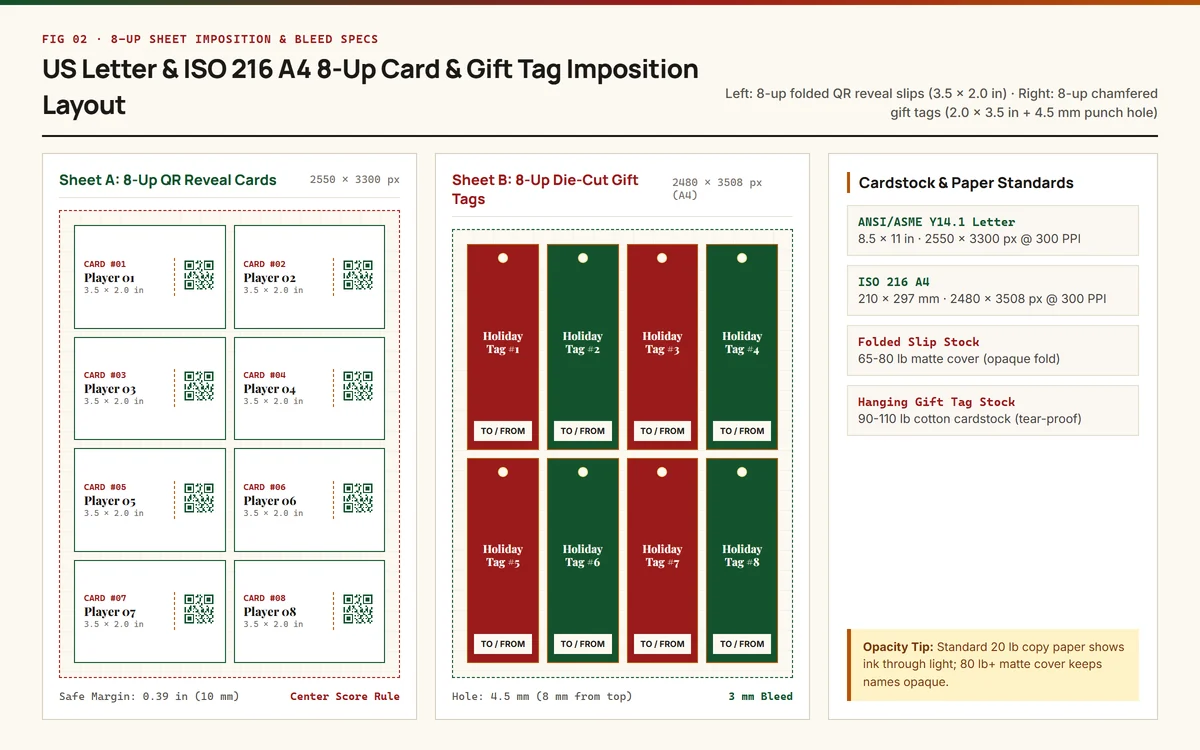
Whether you print on a home inkjet, an office color laser copier, or a neighborhood print shop guillotine, matching standard paper geometry prevents clipped borders and misaligned fold lines across your print sheet:
| Print item | Finished trim size | Pixel dimensions at 300 PPI | Sheet imposition (Letter / A4) | Recommended paper stock |
|---|---|---|---|---|
| Folded cardstock draw slips | 3.5 x 2.0 in (89 x 51 mm) |
1050 x 600 px (+3 mm bleed = 1121 x 671 px) |
8-up or 10-up per sheet | 180 to 220 gsm (65 to 80 lb matte cover) |
| Flat QR reveal cards | 3.5 x 2.5 in (89 x 64 mm) |
1050 x 750 px |
8-up with 10 mm safe margin |
220 to 250 gsm (80 to 90 lb smooth cover) |
| Chamfered holiday gift tags | 2.0 x 3.5 in (51 x 89 mm) |
600 x 1050 px (4.5 mm hole 8 mm from top) |
8-up (4 columns x 2 rows) |
250 to 300 gsm (90 to 110 lb cotton stock) |
North American full sheet (ANSI/ASME Y14.1) |
8.5 x 11.0 in (215.9 x 279.4 mm) |
2550 x 3300 px |
Standard US Letter tray | Lock print dialog to 100% Actual Size |
| International full sheet (ISO 216 A4) | 210 x 297 mm (8.27 x 11.69 in) |
2480 x 3508 px |
Standard A4 tray | Disable Fit to Printable Area |
Preventing light show-through on folded draw slips
The single biggest mistake with home-printed printable Secret Santa draw slips is printing onto standard 75 to 80 gsm (20 lb) office copy paper. Under overhead conference-room LEDs, thin copy paper turns translucent, letting curious guests read folded names right through the back of the slip. Stepping up to 200 gsm (80 lb) uncoated matte cover stock blocks light transmission completely, scores cleanly along the dashed center rule with the back of a butter knife or bone folder, and feeds reliably through straight-path desktop printers.
For hanging gift tags tied onto wine bottles, gift bags, or knitwear boxes with baker's twine or satin ribbon, step up to 250 to 300 gsm (90 to 110 lb) cardstock and punch the marked 4.5 mm (3/16 in) hole at least 8 mm below the top trim edge so heavy ribbons cannot tear through the top margin.
Customizing holiday cards and DIY Secret Santa tags as layered PSD files
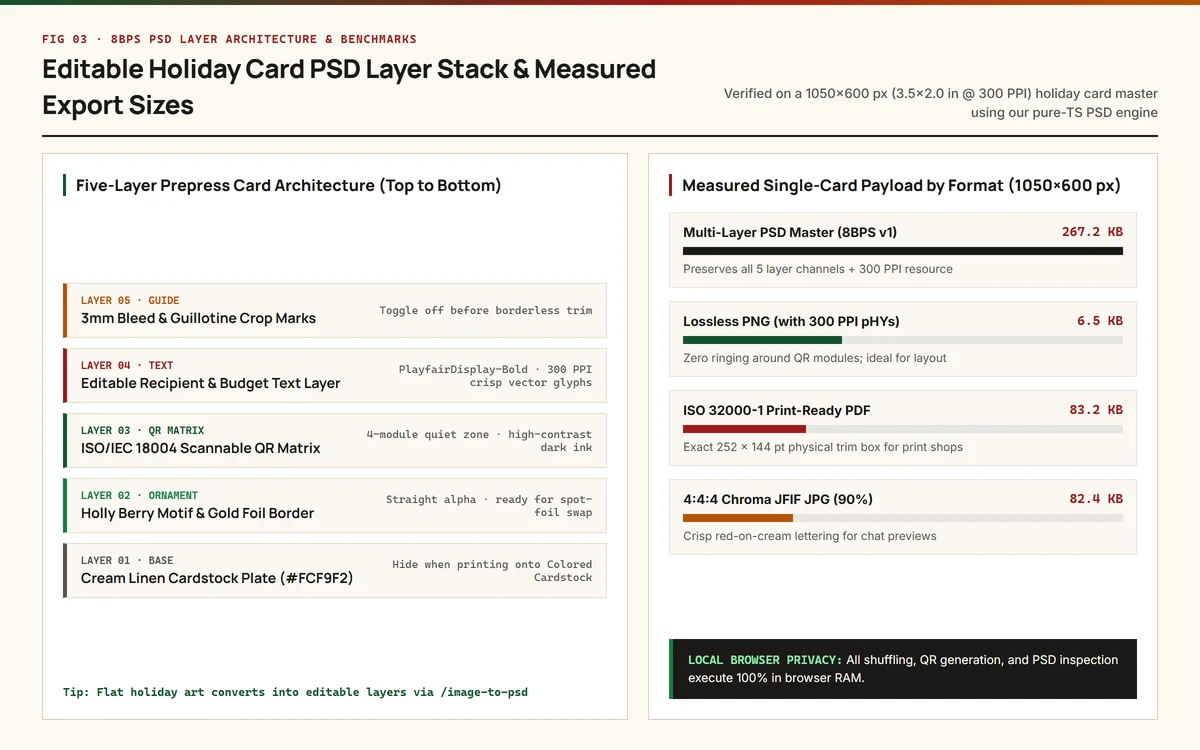
Pre-built browser PDFs get an exchange running in ninety seconds, while designers, print studios, and craft makers often want full control over custom fonts, metallic gold foil plates, or company logos. Structuring your card master inside the Adobe Photoshop 8BPS binary container (documented in the Library of Congress FDD000678 specification) keeps decorative art, variable text, QR codes, and trim marks strictly separated.
To benchmark real file weights, we generated a 5-layer, 300 PPI QR reveal card master (1050 x 600 px, 3.5 x 2.0 in trim) and ran it through our pure-TypeScript binary reader and encoders:
| Output format | Measured byte size | Resolution & color profile | Best production role |
|---|---|---|---|
Multi-layer .psd (8BPS version 0x0001) |
267.2 KB (273,621 bytes) |
300 PPI, 8-bit RGB, 5 editable channels |
Master archive for swapping fonts, colors, and logos |
Print-ready .pdf (ISO 32000-1) |
83.2 KB (85,179 bytes) |
Exact 252 x 144 pt (3.5 x 2.0 in) box |
Direct print-shop imposition and home cardstock printing |
4:4:4 JFIF .jpg (90% quality) |
82.4 KB (84,336 bytes) |
Full chroma (300 DPI JFIF header) |
Sharp red-on-cream digital backups for remote teammates |
Lossless straight-alpha .png |
6.5 KB (6,630 bytes) |
Exact pHYs 300 PPI chunk, zero ringing |
Placing crisp QR cards onto multi-up sheet layouts |
Notice how lossless PNG compresses crisp vector-style holiday borders and high-contrast QR modules down to 6.5 KB with zero JPEG mosquito noise around barcode squares, whereas 4:4:4 JPEG avoids the red-and-green color bleeding common in standard 4:2:0 subsampled images.
If you already have a flattened holiday illustration, vintage botanical wreath, or company postcard image and want to rebuild it with editable layers:
- Drop the flat PNG or JPG into Image to PSD to automatically isolate background paper texture, holly ornaments, and headline lettering into independent Photoshop layers.
- Open the exported
.psdin our zero-upload browser PSD Viewer to verify layer boundaries, toggle trim guides on or off, check embedded font names, and export print-ready PDF or PNG proofs on any laptop or tablet.
Common printing & cutting mistakes to avoid
- QR codes fail to scan on glossy or dark metallic paper. Phone cameras need strong luminance contrast between light quiet zones and dark modules. Never invert a QR code into light ink on dark burgundy paper without testing first; keep a crisp
#FCF9F2or#FFFFFFsquare behind every code on your reveal cards. - Front and back sides shift by 3 mm during duplex printing. Consumer desktop paper trays naturally drift by
1 to 2.5 mmbetween front and back passes. Design single-sided folded slips or leave a generous6 mm (0.25 in)inner border inside your gift tags so minor duplex shift looks intentional. - Printer scales the sheet down to 94%. Browser PDF dialogs often default to "Fit to Page," shrinking
3.5 x 2.0 incards and throwing off pre-scored cardstock templates. Always choose Actual Size (100%) before clicking Print. - Cutting right through adjacent artwork. Leave a
3 mm (0.125 in)bleed where background colors extend past the trim line, and align a metal straightedge or rotary trimmer with outer corner ticks rather than cutting full grid boxes around every card.
Frequently Asked Questions (FAQ)
How to make Secret Santa cards without collecting anyone's email?
Open our browser Secret Santa Generator, type participant names and any couple or household exclusions, and export folded draw slips or scannable QR reveal cards as a 300 PPI PDF. Everything runs locally in your browser with zero signups and zero emails collected.
How can the party host participate without seeing everyone's Secret Santa match?
Choose the QR reveal mode when generating your sheet. Each card displays only the player's own name on the outside while encoding their assigned recipient inside an ISO/IEC 18004 QR matrix, allowing the host to print, trim, and distribute the deck 100% blind.
What is the best cardstock weight for DIY Secret Santa tags and draw slips?
Use 180 to 220 gsm (65 to 80 lb) matte cover stock for folded draw cards so names never show through under bright room lights, and step up to 250 to 300 gsm (90 to 110 lb) cardstock for hanging Printable Gift Tags so ribbon holes resist tearing.
Can we run an offline and remote hybrid exchange if two teammates work from home?
Yes. Hand physical QR cards to everyone in the office and send individual private reveal links or single-card PNG crops via Slack, Teams, or text message to remote coworkers, keeping the entire group in one unified, exclusion-checked draw.
How do I keep handwriting on gift tags from giving away who the Secret Santa is?
Instead of writing names by hand on wrapping paper, type all recipient names into Printable Gift Tags using one uniform holiday serif or script font before printing your 8-up tag sheet. Every package under the tree will share identical typography.
Can I edit my holiday cards and tags in Adobe Photoshop?
Yes. Run any flat holiday card or tag graphic through Image to PSD to generate a multi-layer 8BPS .psd file with separated backgrounds, ornaments, and text, then inspect or export proofs without installing software using our local PSD Viewer.
Next steps
Ready to put how to make Secret Santa cards into action for your office, classroom, or family gathering? Launch the zero-signup Secret Santa Generator to print your deck in seconds, pair your draw sheet with matching 300 PPI Printable Gift Tags and a Secret Santa Questionnaire, or customize layered holiday templates with Image to PSD and PSD Viewer.