ByteDance· Video modelNew

Seedance 2.0 AI Video Generator

Seedance 2.0 is the ByteDance video model that makes picture and sound in one pass, with film-like camera work and steady complex motion. Write a prompt or add a start frame, choose 4 to 15 seconds up to 1080p, and see the credits before you run.

Made with these models

  • 62 credits for 5 s at 720p
  • 4 to 15 s clips, up to 1080p
  • Optional sound, no extra credits
  • About 4.5 min per clip
Made with Seedance 2.0

Seedance 2.0 Video Examples
Original clips made with this model. Turn on the sound, read the full prompt, or press Use this example to load the same settings.

Seedance 2.0
Start frame
Start frame

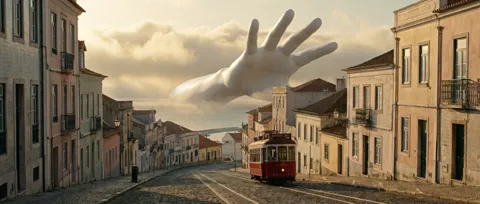
The giant hand

5s · 720p · 62 credits

The giant hand closes gently around the tram and lifts it off the rails. It squeezes: the tram's body bulges between the fingers like glossy red silicone, windows bowing outward. On release it springs back, wobbles twice and settles perfectly normal on the rails, its bell ringing once. The camera slowly pushes in from rooftop height. One continuous shot. Sound: deep rubbery squelch, creaking metal, the tram bell, distant gulls. No music, no text.
Seedance 2.0
Start frame
Start frame

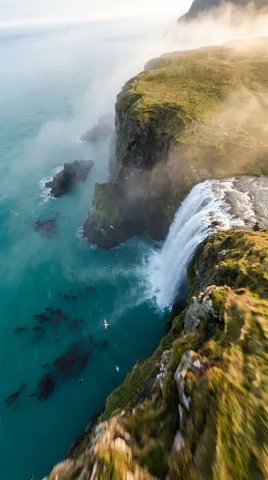
Cliff dive to the reef

5s · 720p · 62 credits

One continuous FPV drone flight: the camera races over the cliff edge, tips forward and dives straight down beside the waterfall through drifting spray, then punches through the ocean surface in a burst of bubbles and keeps flying underwater into a sunlit kelp forest as a giant manta ray glides across the frame. Smooth, fast, no cuts. Sound: rushing wind, waterfall roar, a heavy splash, then a muffled underwater hush. No music, no text.

Where It Shines: Motion, Camera and Sound

ByteDance reports big gains over version 1.5 in physical accuracy, realism and control.

01

Sound made with the picture

Dialogue, effects and music are generated with the video, not dubbed afterwards, so footsteps, rain and speech land on the right frame. Sound costs no extra credits.

02

Camera work like a film crew

Ask for a dolly zoom, a tracking shot, a rack focus or a handheld feel; leave it out and the model plans the camera itself. It can also cut between shots inside one clip.

03

Complex motion that holds

Team sports, dancing, fights and collisions are where earlier models tended to break. This one keeps bodies, fabric and impacts believable through fast action.

04

Start and end frames

Animate one picture, or add an end frame and the clip travels from the first to the second. With no picture, pick one of six shapes.

Seedance 2.0 Specs, Versions and Credits

Three Seedance versions run here. Version 2.0 is the all-rounder for action and camera work, up to 15 seconds. Seedance 2.5 reaches 30 seconds in one take, at 96 credits for 5 seconds at 720p. For drafts, 1.5 Pro (our default video model) makes that clip for 6 credits in about 1.5 minutes.

ModelThis pageSeedance 2.0Seedance 2.5Seedance 1.5 Pro
Credits per clip62 (5 s, 720p)96 (5 s, 720p)6 (5 s, 720p)
Clip length4 to 15 s4 to 30 s4 to 12 s
Resolution480p, 720p, 1080p480p, 720p, 1080p480p, 720p, 1080p
Shapes (text to video)16:9, 9:16, 1:1, 4:3, 3:4, 21:916:9, 9:16, 1:1, 4:3, 3:4, 21:916:9, 9:16, 1:1, 4:3, 3:4, 21:9
End frameYesYesYes
SoundOptional sound, no extra creditsOptional sound, no extra creditsOptional sound, extra credits
Typical waitAbout 4.5 min per clipAbout 5 min per clipAbout 1.5 min per clip

Credits per clip at the default length and resolution, without optional sound. Longer, sharper or with-sound clips cost more; the button shows the credits before you run.

How to Make a Clip in 3 Steps

From idea to MP4 in one composer, with the model already selected.

  1. 1

    Write or upload

    Describe the scene, or add a start frame (and an end frame if you like) to animate a picture.

  2. 2

    Choose the settings

    Pick 4 to 15 seconds, 480p, 720p or 1080p, the shape, sound on or off, and up to 4 clips. Credits update as you choose.

  3. 3

    Generate and download

    A clip takes about 4.5 minutes. Play it on your canvas, download the MP4, or make a loop with video to GIF.

Seedance 2.0 Prompt Guide

Four habits for better clips on the first run.

Direct the camera by name

The model understands real camera language. Name the move, the lens feel and the pace: "slow dolly in, then a whip pan to the door" works far better than "cinematic". One or two moves per shot keep the result clean. For cuts, list them in order: "Shot 1: wide street at night. Shot 2: close-up on her eyes."

Write the sound you want to hear

Sound is created with the picture, so describe it in the prompt: rain on a tin roof, a crowd roaring, a low synth pulse. Put spoken lines in double quotes, for example She whispers, "We are late.", and the model will try to match the lips. Turn sound off if you plan to add your own music later.

Start frames: no real people

Seedance 2.0 and 2.5 do not accept start frames that show real people; ByteDance's own check refuses them before a clip is made. Use illustrated, 3D or AI-made characters instead, or build the shot around products, animals and landscapes. For a photo of a real person, switch to Kling 3.0 Pro in the same composer.

Draft short, then go long

Test an idea at 5 seconds and 480p, which costs 28 credits instead of 62 at 720p. When the motion and sound look right, run the same prompt again at 720p or 1080p and a longer length. Keep one main action per clip and write what happens first, next and last.

Popular Uses for This Video Model

It shines when a clip needs action, a moving camera and sound in one go.

  • Ads and product films

    Product reveals with sweeping camera moves and sound effects, for social ad tests.

  • Short films and trailers

    Chases, fights and big action beats, with several shots in one clip of up to 15 seconds.

  • Dance and sports clips

    Routines, stunts and match moments in vertical 9:16, with sound on the track.

  • Game and story concepts

    Turn character art and environment paintings into moving previews for a pitch.

Seedance 2.0 FAQ

Credits, speed, inputs, rights and limits on ImageToPsd.AI.


Make Your First Seedance 2.0 Clip

Write a prompt or add a start frame. Credits show before you run.