OpenAI· Image model

GPT Image 2 AI Image Generator

GPT Image 2 is an OpenAI image model made for readable text, dense layouts and careful edits. Write a prompt, or add up to 4 reference pictures to change a photo you have. Each image is 3 or 9 credits, ready in about 2 minutes, with no watermark.

Made with these models

  • 3 to 9 credits per image
  • Up to 1K output
  • Edit with up to 4 reference images
  • About 2 min per image
Made with GPT Image 2

GPT Image 2 Examples with Full Prompts

Original, unretouched images made with this model on our site. Open a card for the full prompt, or press Use this example to load it into the generator.

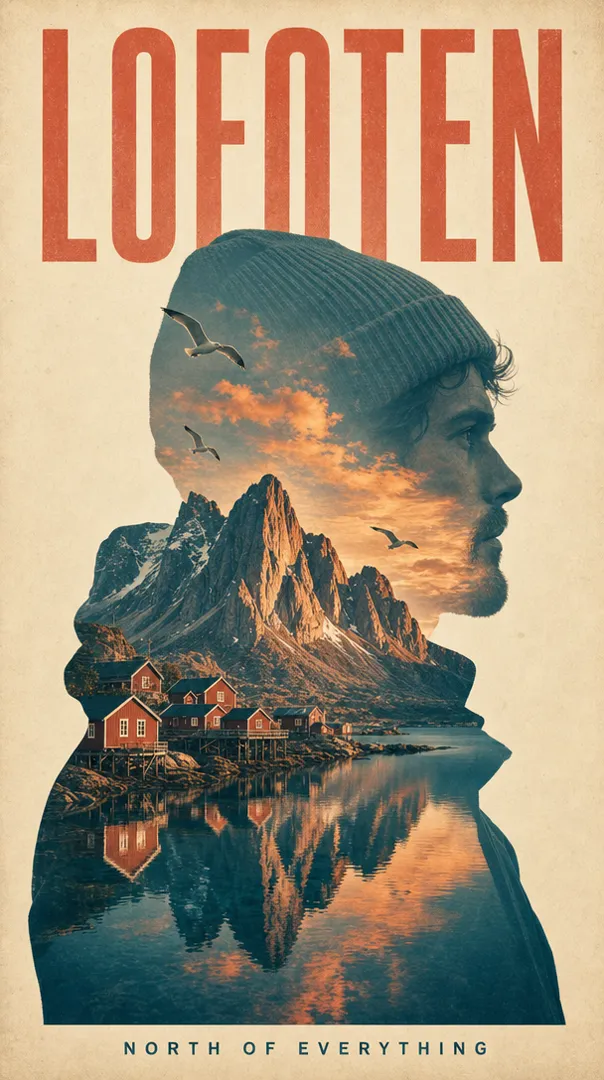
Lofoten travel posterGPT Image 2

Lofoten travel poster

9 credits

A minimalist vintage double-exposure travel poster: the clean profile silhouette of a fictional adult traveler in a wool beanie, and inside the silhouette the Lofoten islands at golden hour, sharp granite peaks, red fishing cabins on stilts, a calm fjord mirroring the sky, gulls in flight. Outside the silhouette, cream paper with subtle grain in a muted teal and coral palette. A large condensed headline at the top reads exactly "LOFOTEN"; a small line at the bottom reads exactly "NORTH OF EVERYTHING". Balanced layout, crisp print texture, no other text.
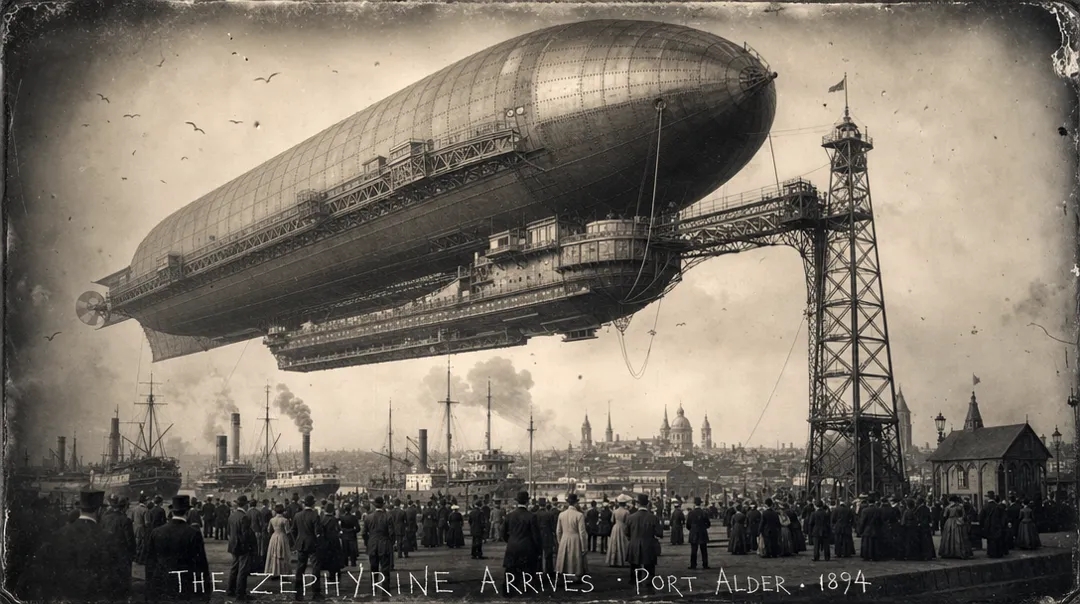
Airship, 1894GPT Image 2

Airship, 1894

9 credits

An 1894 glass-plate photograph from an alternate history: a colossal riveted steam airship, larger than a cathedral, docking at a tall iron mooring tower above a busy Victorian harbor city, crowds in period clothing on the quay, smoke from steamships, gulls in the air. Sepia silver tones, soft vignetting, slight plate damage and dust specks at the edges, believable 1890s optics and fine detail. Along the bottom edge, hand-scratched white caption text reads exactly "THE ZEPHYRINE ARRIVES · PORT ALDER · 1894". Documentary realism, epic scale, no other text.

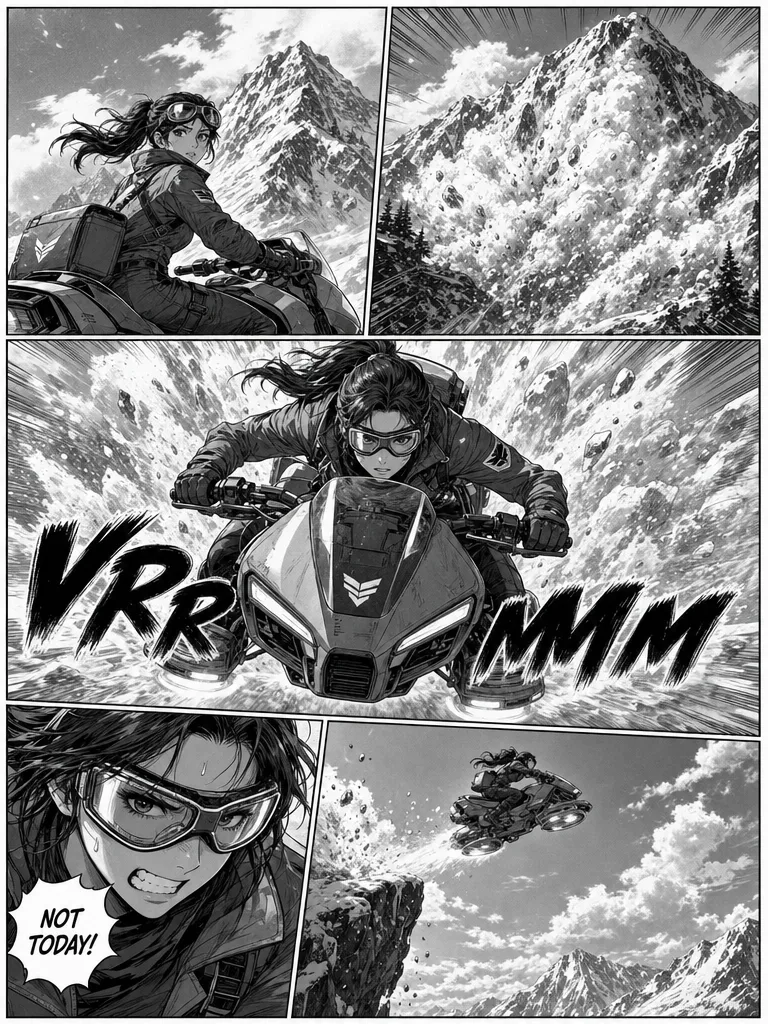
Avalanche manga pageGPT Image 2

Avalanche manga page

9 credits

A full black-and-white action manga page with five dynamic panels and screentone shading. Panel 1: a young adult woman courier in goggles on a hover-bike glances back at a mountain. Panel 2: a massive avalanche erupts down the slope. Panel 3, the largest: she races toward the reader with snow exploding behind her and the sound-effect lettering "VRRRMMM" across the panel. Panel 4: a close-up of her gritted teeth with a speech bubble reading "NOT TODAY!". Panel 5: she launches off a cliff into open sky. Clean inking, speed lines, consistent character design, no other text.

What This OpenAI Image Model Does Well

Four things OpenAI built the model for, and what they mean here.

01

Text that stays readable

OpenAI aimed this release at text-heavy visuals such as posters, diagrams, infographics and comics, with better text rendering across languages. Put each line in quotes and it usually comes back spelled right; check very small print before you publish.

02

Long prompts, followed closely

Ask for six panels, a headline at the top and a price tag in the corner, and it usually keeps each part where you asked, though exact placement can still drift. OpenAI reports more reliable instruction following, detail and composition than in its earlier image models.

03

Edits that keep your details

Add up to 4 reference pictures and say what should change. OpenAI says GPT Image 2 reads every input picture at high fidelity, which helps faces, products and printed labels carry into the result.

04

Many styles, many scripts

The OpenAI launch gallery spans candid photos, manga pages, pixel art and editorial posters, with lettering in Chinese, Japanese, Korean, Arabic and Devanagari, often photo and type in one frame.

Specs, Credits and Quality Levels

On ImageToPsd.AI, GPT Image 2 makes one 1K-class image per run in five shapes. High quality is 9 credits, or 10 for edits with reference pictures; Standard is 3 either way. Draft on Standard, then use High for the final poster, small text or a product shot.

ModelThis pageGPT Image 2Nano Banana ProIdeogram 3.0
Credits per image3 to 97 to 133 to 4
Largest output1K4K1K
Aspect ratios5 shapes10 shapes5 shapes
Reference images (edit)Up to 4Up to 6No
Typical waitAbout 2 min per imageAbout 25 s per imageAbout 25 s per image

Credits per new image; a range covers the resolution or quality options. Editing a picture can cost a little more. The button shows the exact credits before you run.

How to Use GPT Image 2 in 3 Steps

The composer at the top already has this model selected.

  1. 1

    Write the prompt

    Say what the image is for, then the subject, the layout and any words in quotes. To edit, add up to 4 pictures and say what to change.

  2. 2

    Pick shape and quality

    Pick one of five shapes, then High or Standard. The button shows the credits before you run.

  3. 3

    Download or keep going

    Ready in about 2 minutes. Download the PNG, reuse the prompt, or split the result into editable layers.

GPT Image 2 Prompt Guide

Four habits from the OpenAI prompting guide that help the model do what you mean.

Start with the purpose

Name what the image is for before you describe it: a product ad, a conference poster, a recipe infographic. Then give the scene, the subject, the details and the limits. For complex requests OpenAI suggests labeled sections such as Scene, Subject, Details and Constraints, so each part is easy to change later.

Put every word in quotes

Write the exact text in quotes and say where it sits and how it looks, for example the headline "OPEN LATE" in bold condensed letters across the top. Spell unusual names letter by letter, ask for no extra text, and choose High quality when the print is small or the layout is dense.

Separate changes from what stays

When you edit with GPT Image 2, say change only the jacket to red leather, then list what must stay: the face, the pose, the light and the background. Name unwanted extras too, such as logos or watermarks. If you edit one picture several times, repeat the keep list each time.

Give each picture a role

With several reference pictures, number them and say what each one is for: image 1 is the product, image 2 is the room, image 3 sets the colors. Then say how they combine, for example place the bottle from image 1 on the table in image 2 and match its light.

What to Make with This Image Model

Made for work where the words and the layout matter as much as the picture.

  • Posters and ads

    Event posters, sale banners and social graphics with the headline, date and price written in.

  • Infographics and slides

    Diagrams, step-by-step explainers, charts and slide visuals with labels people can read.

  • Product shots

    Your product in a new scene, color or season, made from a photo you upload.

  • Comics and storyboards

    A full comic page or a storyboard sheet, panels and speech bubbles included, in one image.

GPT Image 2 FAQ

Credits, wait time, inputs, commercial use and how this site works.


Make Your Next Poster Here

Write the words, pick a shape and see the credits before you run.