MiniMax· Video model

Hailuo AI Video Generator

Make Hailuo AI videos with Hailuo 2.3, MiniMax's model for lifelike body movement, natural faces and anime or ink painting styles. Write a prompt or add a start frame for a 6 or 10 second 768p clip, and see the credits before you run.

Made with these models

  • 12 credits for 6 s at 768p
  • 6 or 10 s clips, up to 768p
  • No sound
  • About 7 min per clip
Made with Hailuo 2.3

Hailuo AI Video Examples

Original clips made with this model. Read the prompt, or press Use this example to load the same settings.

Hailuo 2.3
Start frame
Start frame

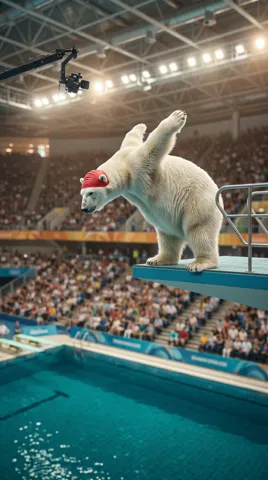
Polar bear high dive

6s · 768p · 12 credits

The polar bear bounces twice on the platform, springs into the air and performs a surprisingly graceful forward somersault with its fur rippling, then hits the water in a gigantic belly-first splash that throws a wall of spray over the first rows. The camera tilts down with the fall like a broadcast replay. One continuous shot, realistic weight and water physics. No text.
Hailuo 2.3
Start frame
Start frame

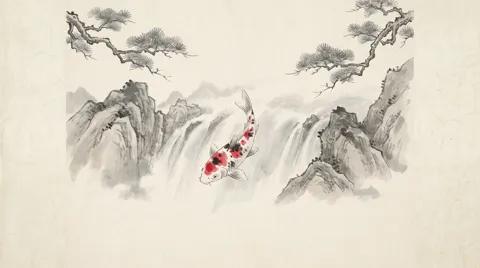
Ink koi leaps the falls

6s · 768p · 12 credits

The painting comes alive in ink-wash style. The koi flicks its tail and rings of grey ink ripple across the paper. It swims up the painted waterfall, leaps high out of the spray in a graceful arc, scattering drops of black ink and vermilion that bloom like petals across the paper, then dives back into the pool below. Slow push-in, one continuous shot, painterly brush texture throughout. No text.

Motion, Faces and Style: Where It Shines

MiniMax released Hailuo 2.3 in October 2025 as the follow-up to Hailuo 02. These are the gains it lists.

01

Complex body movement

MiniMax says this version renders complex body movement with more fluidity, precision and control, which helps dance steps, fight moves, sports and quick turns.

02

Natural faces

Live-action faces and micro-expressions look more natural, MiniMax says: a held breath, a half smile, a glance away. Good for close-ups and character moments.

03

Anime, illustration and ink painting

Stylized looks improved too: anime, illustration, ink wash painting and game CG. Add your artwork as the start frame and describe how it should move.

04

Light and motion commands

MiniMax cites near-photorealistic lighting direction, shadow transitions and color tones, plus a better response to motion commands for objects. Say plainly what moves and how.

Hailuo 2.3, Fast and MiniMax H3 Max Compared

The standard model makes silent 6 or 10 second clips at 768p, from text (16:9) or a start frame, in about 7 minutes. In a hurry? The Fast version animates a start frame in about 1.5 minutes for 8 credits. Need sound, 1080p or 15 seconds? MiniMax H3 Max, from the newer H3 generation, takes about 1 minute.

ModelThis pageHailuo 2.3Hailuo 2.3 FastMiniMax H3 Max
Credits per clip12 (6 s, 768p)8 (6 s, 768p)19 (5 s, 768p)
Clip length6 or 10 s6 or 10 s3 to 15 s
Resolution768p768p480p, 768p, 1080p
Shapes (text to video)16:9Follows the start frame16:9, 9:16, 1:1, 4:3, 3:4, 21:9
End frameNoNoYes
SoundNo soundNo soundSound always on
Typical waitAbout 7 min per clipAbout 1.5 min per clipAbout 1 min per clip

Credits per clip at the default length and resolution, without optional sound. Longer, sharper or with-sound clips cost more; the button shows the credits before you run.

How to Use Hailuo AI on ImageToPsd.AI

Three steps, then a wait of about 7 minutes.

  1. 1

    Write the action

    Describe who moves, what they do and how the camera follows. Add a start frame to animate a picture.

  2. 2

    Choose 6 or 10 seconds

    6 seconds is 12 credits and 10 seconds is 23. Make up to 4 clips per run; the credits on the button update as you go.

  3. 3

    Come back in about 7 minutes

    Hailuo 2.3 takes about 7 minutes, so start the run and do something else. Then play the clip, download the MP4, or loop it with video to GIF.

Hailuo Prompt Guide

Four tips that play to this model's strengths.

Lead with the action

Body movement is this model's strong point, so put it first and in order: a dancer spins twice, drops to one knee and looks up at the camera. Use plain verbs and say how fast things happen. One clear sequence per clip works better than a list of unrelated moves, especially in 6 seconds.

Name one camera move

Choose a single move and name it: slow push in, orbit, tracking shot from the side, crane up. One clear instruction is easier for a video model to follow than three stacked ones, and it keeps the action readable. If the camera should stay put, write static camera, so only the subject moves.

Set the style up front

For anime, ink wash painting, illustration or game CG, open the prompt with the style: hand-drawn anime style, a girl runs across a rooftop at sunset. Better still, add a start frame in that style so the model only has to move it. Text to video comes out in 16:9; a start frame keeps its own shape.

Plan for a silent clip

Clips from this model have no sound. Add music or a voice-over in your editor, or switch to MiniMax H3 Max when the shot needs built-in sound. For a short idea, turn on Enhance and our prompt helper expands it into a fuller prompt before the run; the version used is shown with the result.

What to Make with Hailuo

Hailuo 2.3 suits shots where people or characters really move.

  • Dance and action

    Dance clips, fight beats and sports moments with full body movement.

  • Anime and art in motion

    Bring anime frames, illustrations and ink paintings to life in their own style.

  • Character close-ups

    Small expressions for story beats, reaction shots and music videos.

  • Product shots

    Objects that turn, pour or open on cue for store pages and ads.

Hailuo AI FAQ

Versions, credits, wait times and limits.


Make a Hailuo AI Video Now

Write a prompt or add a start frame, pick a length, and see the credits first.